
Live demo access
Try the working Business Suite demo first, then contact us when you want setup for your own company data and users.
VASUYASHII Business Suite brings billing and stock records into one browser-based workspace. Create invoices, manage stock, track purchases, record payments, handle expenses, generate PDFs and share bills securely on WhatsApp through the current browser-based platform. Dedicated mobile and native desktop apps are future roadmap items.
Early access
Rs. 2,500/year
founder plan for first customers covering GST billing, inventory, purchases, payments, expenses, reports and PDFs.
Rollout style
ERP-lite
simple business management for Indian SMEs without SAP/Odoo-style enterprise complexity.
Live demo access
Open the live demo, login with the sample account, check the billing and inventory flow, then contact VASUYASHII when you want your own company setup, onboarding, data preparation, user roles, or rollout support.
Demo link
https://suite.vasuyashii.com/User
sample@gmail.com
Password
12345678
VASUYASHII Business Suite is designed for traders, wholesalers, retailers and growing businesses that want billing, inventory, purchases, payments, expenses and reports without heavy enterprise software.
Try the working Business Suite demo first, then contact us when you want setup for your own company data and users.
Invoices, products, purchases, payments, returns and reports are structured as real business screens, not only marketing mockups.
The scope supports GST invoice records, paid/due tracking, backend-generated PDF invoices and template previews.
Invoice/document sharing is positioned around secure public PDF links, with customer verification support where enabled.
A user can manage multiple companies/firms with separated data and company-specific invoices, payments, purchases and stock history.
This is positioned as GST billing, inventory and business management software for SMEs, not a heavy SAP/Odoo-style enterprise ERP.
The current product runs in a web browser. Dedicated mobile and native Mac or Windows applications are roadmap items and are not included in the current plan.
Connected Product Scope
These are actual Business Suite screens covering the owner dashboard, product master, purchases and reports. Use sample records when reviewing the current browser interface and test each workflow yourself.
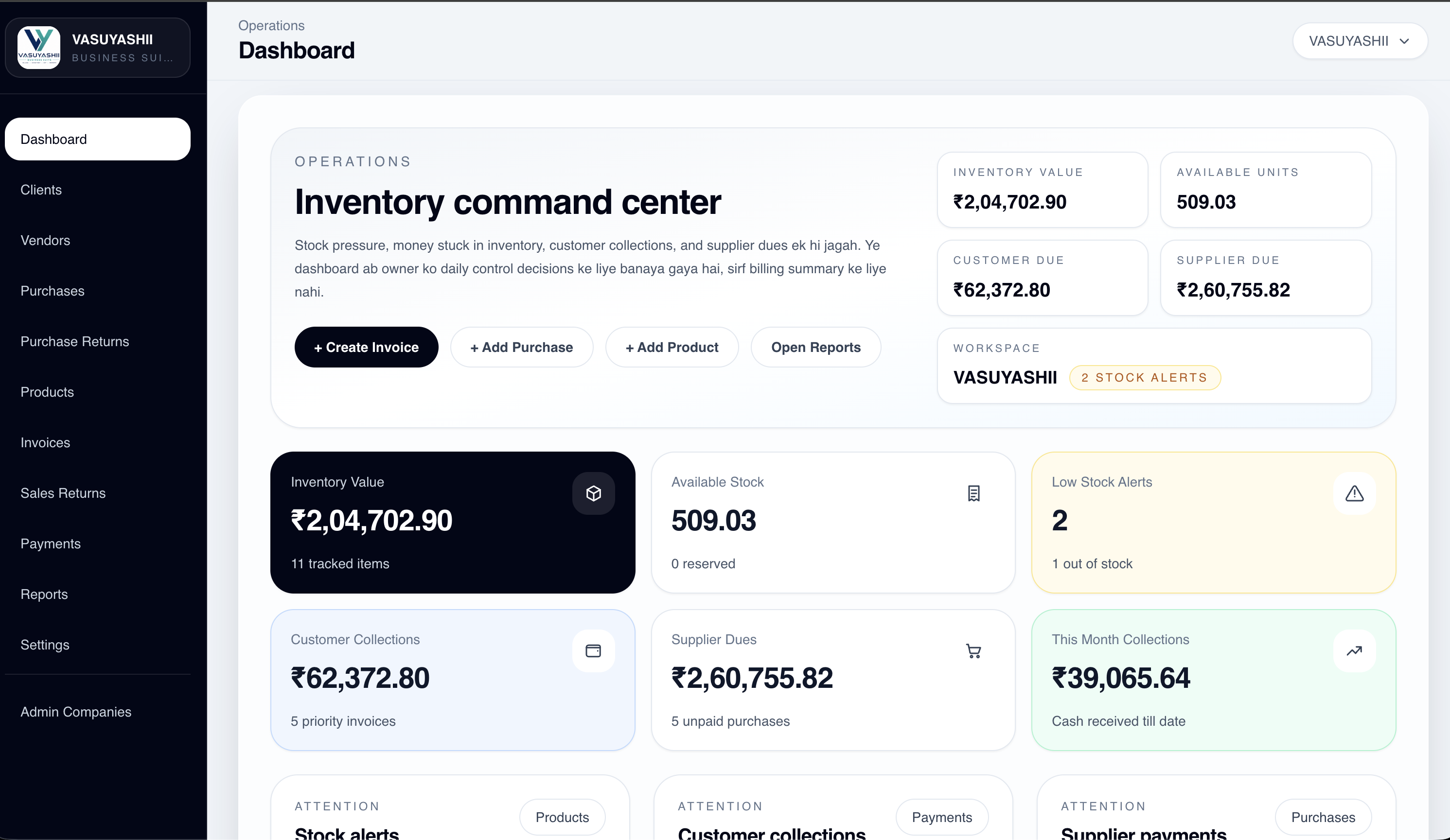
Review inventory value, available units, customer dues, expenses and daily operating signals from one workspace.
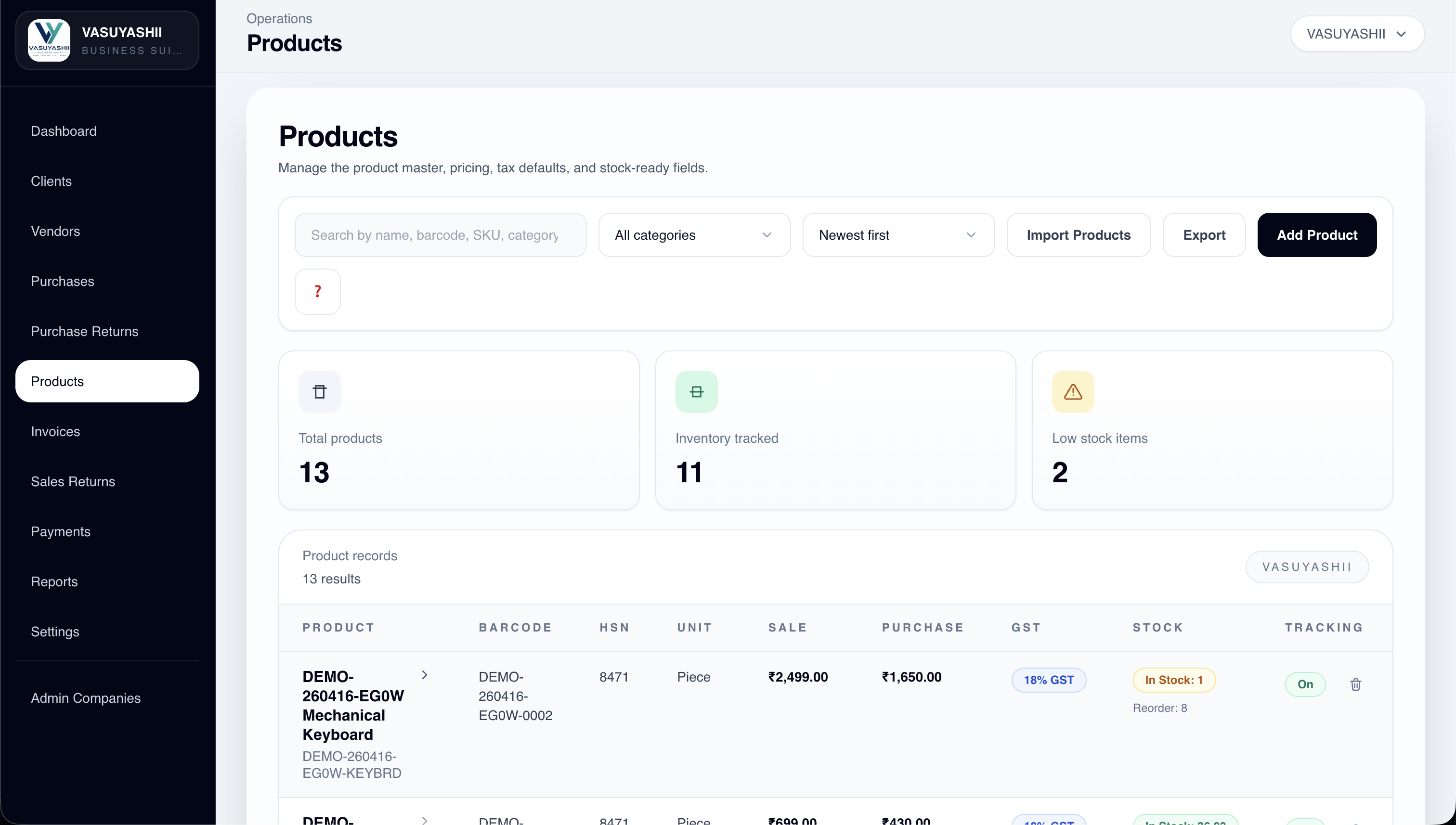
Maintain product details, SKU or barcode, prices, GST information and current stock for daily billing and purchase work.
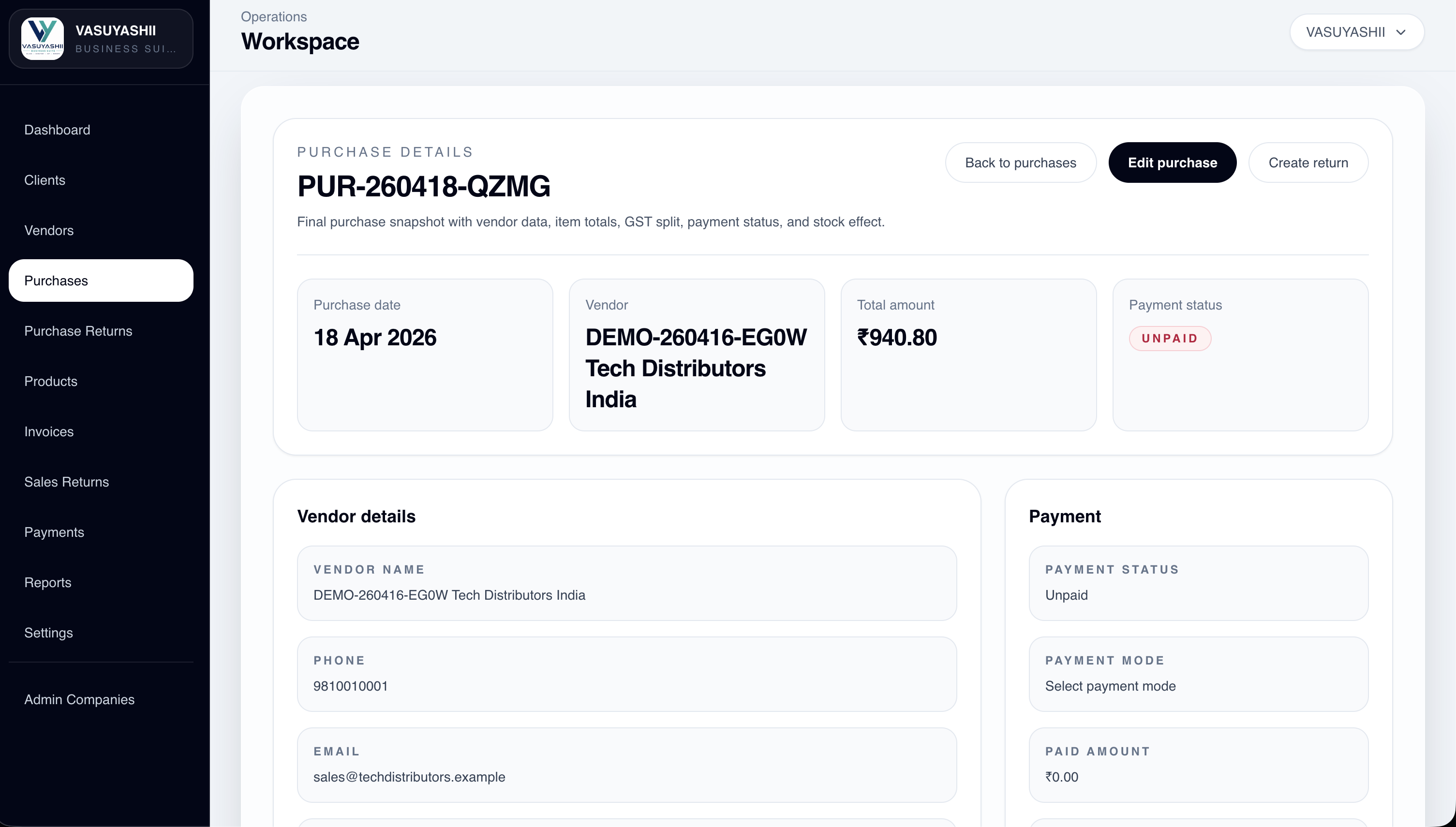
Record supplier purchases and keep purchase history connected with vendors, products and stock updates.
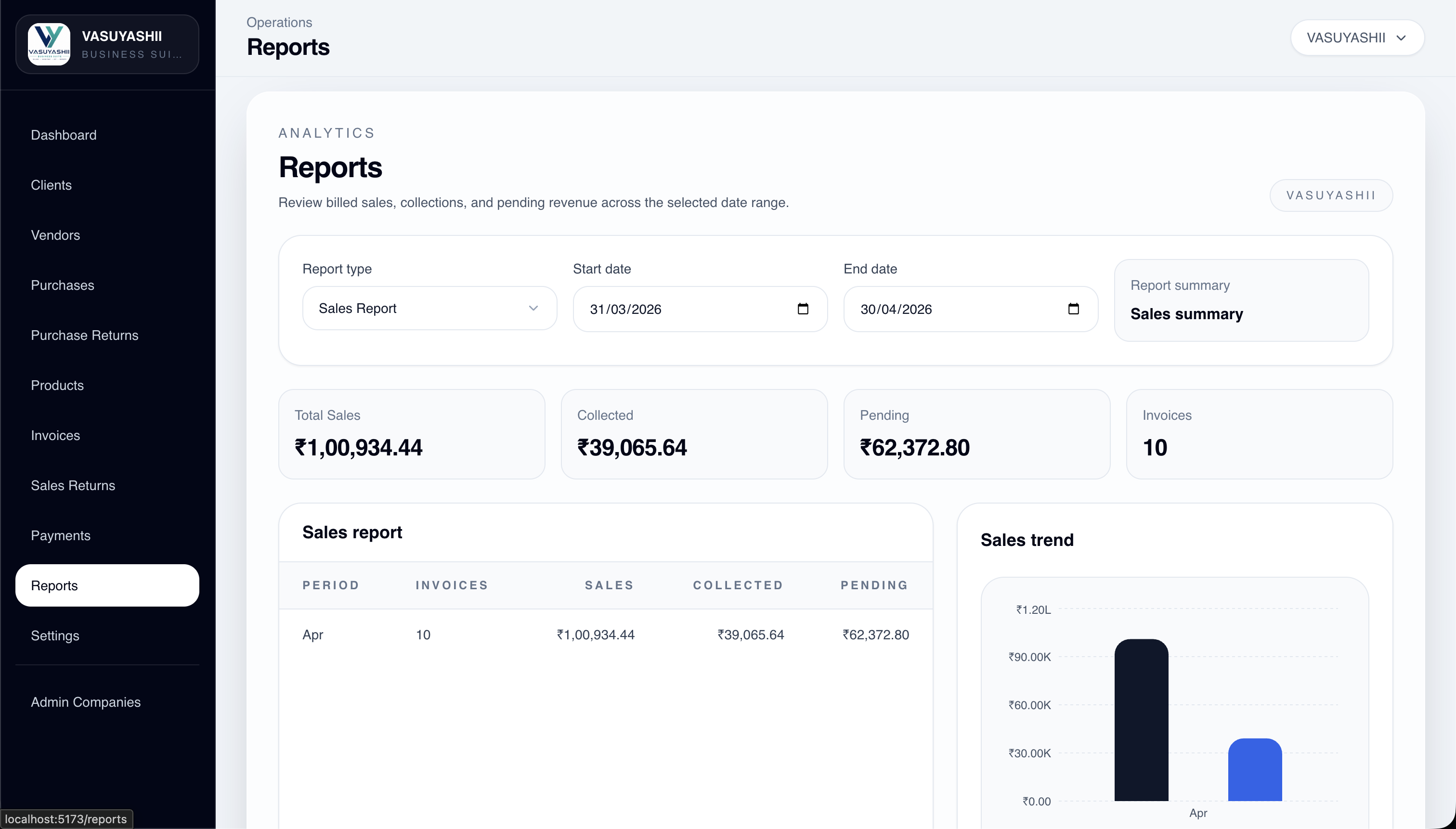
Use sales, purchase, payment, expense and stock views to answer practical owner and admin questions.
Compare the existing product with the work your team needs to do. The walkthrough should use sample records, show the document behind each change and make any configuration or custom-development gap clear.
Review customer and product records, invoice quantities and rates, configured tax, discounts, payments, dues and PDF output together. The invoice and payment history should explain what the customer owes.
Invoice records do not imply statutory filing, e-invoicing or complete accounting coverage. Confirm those requirements and any external connection separately.
Review product codes, units, prices, stock visibility, purchases and returns as one operating flow. Start with clean product records and a sample stock check before moving business data into daily use.
Multi-company support does not automatically establish branch transfers, batch or expiry tracking, manufacturing or every retail variant workflow. Check your specific requirements in the demonstration.
Need a workflow outside the current product? Compare a separately scoped custom software build. Configuration, migration, integrations, hosting and support should be explicit in the proposal.
Business Suite sample walkthrough
Review your daily workflow with sample records. Check the invoice, stock and payment results together before agreeing your company setup and acceptance criteria.
Review an example product's unit, price, GST details and available stock. Compare the fields with the records your team currently maintains.
Check its customer, line items, tax, total and paid/due amounts. Review the PDF and print actions against your invoice requirements.
Review the related customer, payment and purchase screens. List any missing workflow before deciding fit; accounting ledgers and statutory integrations remain outside the stated current scope.
The current scope covers practical ERP-lite operations: billing, stock, product masters, parties, purchases, returns, payments, expenses, reports, PDFs, backups and multi-company usage.
It is a practical business suite for Indian SMEs that need one operational layer across GST billing, inventory, clients, vendors, purchases, payments, expenses, PDF invoices and business reports.
Business overview with sales, dues, stock, activity and quick numbers owners can check daily.
Store customer phone, email, GSTIN, address, city, state, invoices and payment history in one place.
Manage supplier GSTIN, contact, address and purchase records for cleaner vendor tracking.
Product master with SKU/barcode, HSN/SAC, unit, GST rate, sale price, purchase price, stock and low-stock visibility.
Create GST invoices with products, quantity, rate, discount, tax, paid/unpaid status, due tracking and PDF generation.
Record supplier purchases with GST, rate, quantity, purchase history and stock update support.
Track returned sales and purchase items so records stay clear for daily operations.
Record customer payments, track paid and due amounts, and keep payment history connected to business records.
Add business expenses with categories, payment method and amount tracking for basic expense visibility.
Sales, payment, purchase, expense and stock-related insights for owner/admin decisions.
Backend-generated invoice PDFs with company details, GST, totals, bank/payment details, preview and regeneration.
Share invoice PDFs through secure public links instead of private authenticated backend URLs.
Company-level backup and restore with dry-run validation before actual restore.
Manage multiple firms with company-wise data separation, company switch and master-copy support.
Company-scoped team access with role and permission-based control where configured.
Platform admin visibility for active users, companies, recent activity and usage counts.
This product is for Indian businesses that need simple daily control across billing, stock, purchases, payments and reports, not a heavy enterprise ERP rollout.
Hardware and electrical shops that need GST billing, stock control and purchase tracking
Wholesalers, distributors and suppliers managing products, payments, dues and vendor records
Retail, trading, garment, footwear, stationery and mobile-accessories businesses
FMCG and general suppliers that need invoices, stock, reports and WhatsApp document sharing
Small manufacturers or service businesses needing simple billing, inventory and business visibility
Businesses with multiple firms/companies that need company-wise data separation
Most small businesses do not need SAP or Odoo-style complexity on day one. They need reliable billing, stock, purchases, payments, expenses, PDFs and owner reports that the team can use every day.
Faster adoption because staff use familiar billing, purchase, payment and stock workflows.
Better owner control through dues, expenses, inventory, reports and activity visibility.
Cleaner records across customers, vendors, products, invoices, purchases and returns.
Clear path for future accounting, reminders, statutory integrations, mobile app, Mac app and Windows exe add-ons.
Business Suite Hub
Review the current browser product for billing, stock, purchases, payments, expenses, reports, PDF invoices, secure WhatsApp sharing, and multi-company access. Roadmap platforms are labeled separately.
The rollout starts with the current Business Suite scope first. Company onboarding and configuration are scoped on request. Advanced accounting, statutory integrations, WhatsApp API automation, dedicated mobile apps, and native desktop apps remain future roadmap items.
We show the working Business Suite flow and confirm whether your billing, stock, purchase, payment and expense needs fit the current product.
Company details, GST information, users, roles, product masters, clients, vendors and invoice templates are prepared.
The team starts using invoices, purchases, inventory, payments, expenses, reports, PDFs and WhatsApp sharing in daily work.
After usage starts, we support adoption, assess configuration requests, and record future roadmap needs without presenting them as current features.
Availability
These labels describe what can be used now, what requires a written onboarding scope, and what is not currently included.
Currently available
Use the current browser product and sample-account demo for the listed billing, inventory, purchase, payment, reporting, PDF, backup, and multi-company workflows.
Available on request
These services require access, sample data, implementation assumptions, and a separate written scope before work begins.
Future roadmap
These modules and dedicated platforms are directions for future development, not features promised by the current subscription.
Not included in the current product scope
Full accounting ledger, Balance sheet / P&L / trial balance, Payroll or HR, Manufacturing BOM, Advanced CRM, Direct e-way bill / e-invoice integration, TDS/TCS, Bank reconciliation, Full Tally replacement. Any future availability, price, and rollout date must be confirmed in a written scope.
Product Questions
The current scope covers GST billing, products and stock, clients, vendors, purchases, sales and purchase returns, payments, expenses, reports, PDF invoice templates, backup and restore, multi-company use, and team access where configured.
No. It is an ERP-lite billing, inventory and business management product. Full ledgers, balance sheet, P&L, payroll, TDS/TCS, bank reconciliation and statutory integrations are not included in the stated current scope.
Yes. Open the live demo and use the sample login shown on this page. Review the dashboard, billing, inventory, purchase, payment, report and PDF workflows before discussing your company setup.
Yes. Multi-company support keeps company data separated and supports company switching. Invoices, purchases, payments, dues and stock history remain company-specific.
The browser-based web app is the current platform. Dedicated mobile, Mac and Windows applications are future roadmap items and are not included in the current plan.
No. Creating an invoice record or PDF does not mean it has been submitted to a statutory system. Direct e-invoice and e-way bill integrations are outside the stated current plan; confirm these requirements separately before choosing the product.
Multi-company support separates the records of different firms. It does not by itself establish warehouse transfers, batch or expiry tracking, serial numbers or manufacturing workflows. Ask to see each required workflow in the agreed product version and record any gaps before setup.
It covers the stated current browser-product scope for first customers. Onboarding, data migration, configuration, custom development, and integrations require separate confirmation and pricing. Dedicated mobile and desktop applications are not currently included.
The founder / early access plan can help first customers start with GST billing, inventory, clients, vendors, purchases, payments, expenses, reports, PDF invoice sharing and basic support at Rs. 2,500/year. Onboarding and configuration can be scoped separately; dedicated mobile and native desktop apps remain roadmap items.
Early-access pricing applies to the stated current scope and may change for future customers. Data migration, custom development, statutory integrations, WhatsApp API automation and advanced accounting require separate scope confirmation. Dedicated mobile and native desktop apps are not included in the current plan. Review the service terms and support scope before setup.