
March 20, 2026
Headless Website Architecture for Businesses
Headless website architecture explained for 2026 with benefits, SEO impact, cost, CMS options, and when to choose headless over WordPress.
Read articlePublished Updated
Compare the best CMS for business and SaaS websites by editing workflow, design speed, SEO control, security, integrations, ownership, and migration risk.
For most SaaS marketing websites, the best CMS is not the platform with the longest feature list. Choose Webflow when visual marketing speed and managed hosting dominate, WordPress when familiar editorial publishing and a broad ecosystem matter, and Sanity or Strapi with Next.js when structured content, developer control, and multi-channel delivery justify a headless setup.
A CMS (Content Management System) helps your team update pages, blogs, images, services, and sometimes products without needing a developer for every small change. In 2026, the decision affects much more than editing. It affects:
Most business owners choose a CMS based on popularity or the first-year price, then discover the real constraint later: editors cannot publish safely, developers must fix routine changes, or the platform cannot support the next business workflow. The best CMS is the one your team can operate without creating a performance, security, or migration problem.
This guide compares the best CMS platforms for businesses in 2026, including WordPress, Webflow, Shopify, headless CMS options like Strapi and Sanity, and enterprise tools like Contentful. I’ll also explain which CMS is best for:
If you want the fastest decision:
For a SaaS website specifically:
You can create a temporary website without paying a developer by using a free builder plan, a local installation or a platform trial. A business website is rarely free to operate because a professional domain, hosting or platform plan, business email, maintenance, content time and support still have a cost.
| Approach | Cash cost at the start | Main limitation | Suitable use |
|---|---|---|---|
| Free builder subdomain | Often zero | Platform branding, limited domain/control, restricted features | Learning or temporary validation |
| Self-built WordPress/CMS | Low software cost | Hosting, updates, security and your time remain | Owner can maintain the setup |
| Managed website builder | Monthly or annual subscription | Platform limits and migration dependency | Small marketing site with internal ownership |
| Professionally delivered website | Scoped project plus operating costs | Higher initial spend | Business needs design, SEO, tracking, QA and handover |
It can reduce the initial invoice when the scope is simple and you already know the platform. Compare total cost: learning time, content preparation, design quality, form reliability, SEO setup, accessibility, analytics, maintenance and future migration. DIY is not cheaper if the website delays enquiries or must be rebuilt.
A hosted builder provides an integrated editor, hosting and support boundary. WordPress provides broader publishing flexibility but requires decisions about hosting, themes, plugins, updates, backups and security. Choose based on who will publish and maintain the website, not on the word “free.”
For project-level pricing, use the website development cost guide. For the custom-build boundary, compare the custom website versus WordPress guide.
| Decision factor | WordPress | Webflow | Sanity / Strapi + Next.js | Contentful |
|---|---|---|---|---|
| Marketing design speed | Good with the right theme/builder | Strong | Depends on frontend team | Depends on frontend team |
| Editorial familiarity | Strong | Good | Requires configured studio/admin | Strong after setup |
| Structured reusable content | Possible, needs discipline | Moderate | Strong | Strong |
| SEO control | Strong with careful setup | Strong for common needs | Strong when engineered correctly | Strong when engineered correctly |
| Maintenance ownership | Plugins, theme, hosting | Vendor-managed platform | Frontend + CMS engineering | Enterprise content operations |
| Migration/export effort | Depends on plugins and data shape | Review export limits | Plan schemas and asset export | Plan models, API use, and contracts |
Do not score only the editor. Test preview, redirects, canonical control, structured data, image handling, internal links, role approvals, backups or exports, and the process for shipping a frontend change.
If you’re building business software, portals, dashboards, or SaaS, explore: Web Applications Services
VASUYASHII currently uses a file-based Next.js and MDX publishing workflow for its public website and blog library. That choice gives direct control over routes, metadata, canonical URLs, structured data, internal links, and static output. It also exposes the real trade-off: publishing requires a developer-friendly workflow rather than a visual editor.
This makes the website a useful CMS decision example:
The important lesson is not that one stack is universally better. The publishing owner and operating model should decide the CMS. Review the web technology selection guide before comparing vendors, and inspect VASUYASHII services to see where content websites and operational products require different architecture.
A CMS typically manages:
But a CMS does NOT automatically give you:
Think of a CMS like a “content engine.” Your ranking and results still depend on:
The CMS and frontend are one system. Example: WordPress
Pros:
Cons:
Everything is hosted and managed. Example: Webflow
Pros:
Cons:
CMS is only content backend, and frontend is separate (Next.js/React). Examples: Strapi, Sanity, Contentful
Pros:
Cons:
Before picking any CMS, answer these questions:
1) Who will update content? You, your staff, or a developer?
2) How often will you publish? Daily blogs? Weekly? Rare updates?
3) Is SEO a priority? If yes, you need clean URLs, good schema, fast speed.
4) Will you scale into web apps later? Dashboards, portals, automations?
5) What is your budget for maintenance? Some CMS setups are cheap initially but expensive later.
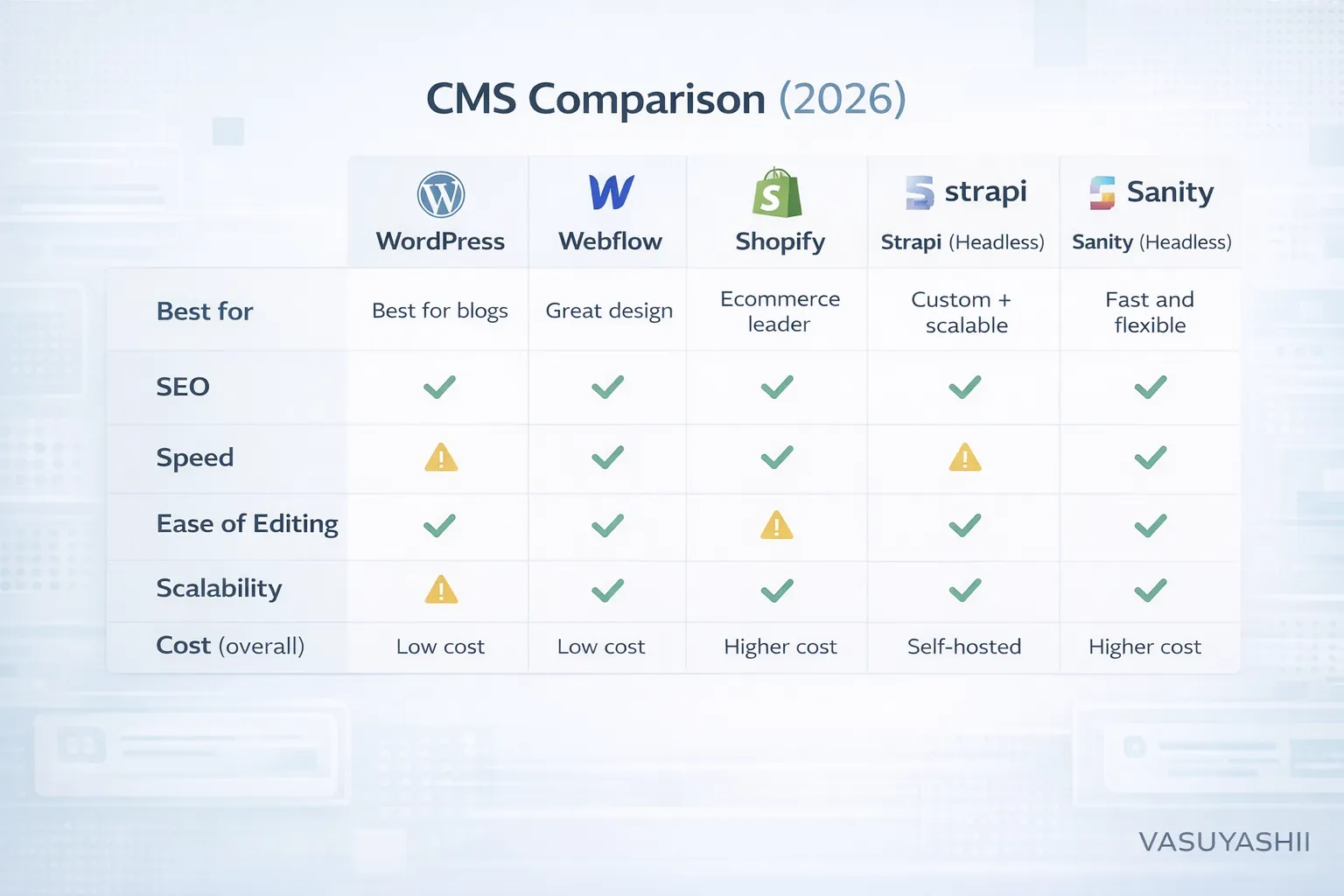
Key comparison factors:
Now let’s break down the best CMS platforms one by one.
WordPress is the most popular CMS. It powers millions of sites because it’s flexible, cheap to start, and easy to manage.
✅ Best blogging workflow ✅ Lots of SEO plugins (RankMath/Yoast) ✅ Huge theme ecosystem ✅ Easy to hire developers for it ✅ Can handle service sites + blogs well
⚠️ Security risks if plugins/themes are outdated ⚠️ Speed issues if page builders are heavy ⚠️ Plugin conflicts can break things ⚠️ Too many auto-generated pages can create thin content
Verdict: WordPress is best when your priority is daily blogging + easy content editing, and you can maintain it properly.
Webflow is a visual CMS + hosting platform. It’s popular for premium marketing websites because it gives great control over design without writing full code.
✅ Premium design control ✅ Hosting is managed (less maintenance) ✅ Good performance by default (usually) ✅ CMS collections for blogs, case studies, services
⚠️ Not ideal for complex apps and portals ⚠️ Pricing can increase as content grows ⚠️ Some advanced SEO and technical changes require expertise
Verdict: Webflow is best for corporate websites, agencies, and marketing sites where design quality is the top priority.
If you sell products, Shopify is the best all-in-one platform:
✅ Very stable, secure ecommerce ✅ Easy product management ✅ Great payment integrations ✅ App ecosystem for ecommerce features
⚠️ Monthly cost + app costs ⚠️ Customization limited compared to full custom builds ⚠️ For heavy content SEO, you may still need blog strategy and custom work
Verdict: For ecommerce, Shopify is usually the best CMS choice.
Strapi is a headless CMS that you can host yourself. It’s great when you want a custom Next.js website but still want a CMS panel to edit content.
✅ Full control over content structure ✅ Works beautifully with Next.js ✅ Great for SEO-friendly content models ✅ Can scale beyond blogs (case studies, services, dynamic pages)
⚠️ Needs hosting and maintenance ⚠️ Needs developer setup ⚠️ You manage security updates
Verdict: Strapi is ideal for custom business websites and web apps where you want long-term scalability.
Sanity is a modern headless CMS with real-time editing and powerful content modeling. It’s used by many modern startups.
✅ Modern editing experience ✅ Real-time content updates ✅ Strong content modeling ✅ Great for scaling content + structured data
⚠️ Needs dev setup ⚠️ Pricing may scale with usage ⚠️ Requires proper implementation for SEO
Verdict: Sanity is excellent for premium modern websites and SaaS marketing sites.
Contentful is an enterprise-grade headless CMS. Big companies use it when they have:
✅ Enterprise workflows ✅ Good structured content management ✅ Scales for large organizations
⚠️ Expensive compared to others ⚠️ Developer setup required ⚠️ Overkill for small businesses
Verdict: Great for large teams, not necessary for most small businesses.
When a business needs an independent frontend and structured editing workflow, compare the operational requirements in the headless website architecture guide, including preview, publishing, cache invalidation, monitoring, and exit planning.
For a SaaS website, the correct CMS depends on who publishes, how often content changes, and whether product data must come from the application. A marketing team that needs visual control may prefer Webflow. A content-heavy team may prefer WordPress. A product with documentation, localization, and content reused inside an app may benefit from Sanity, Strapi, or Contentful.
Do not choose a headless CMS only because it sounds modern. It introduces preview, deployment, image, caching, schema, and editor-workflow decisions that a simpler business website may not need. Likewise, do not choose WordPress only because hosting is cheap if the project needs complex authenticated workflows. Those are usually better handled as a custom web application with a CMS used only for public content.
Use this decision sequence:
The CMS alone does not create rankings. Crawlable architecture, useful content, internal links, speed, and maintenance still matter. Review the SEO-friendly website development guide and the SaaS architecture guide before committing to a stack. For a requirement-based recommendation, review software development services or contact VASUYASHII.
✅ WordPress OR Next.js + headless CMS (Strapi/Sanity)
✅ Webflow OR Next.js + headless CMS
✅ Next.js + Sanity/Strapi
✅ Shopify
✅ Webflow OR WordPress
Since your plan is aggressive blogging, you need:
1) WordPress (easiest to publish) 2) Next.js + MDX workflow (like your current setup) 3) Next.js + Headless CMS (Sanity/Strapi) (best long-term)
Your current MDX approach is powerful, but you must keep:
Avoid these:
A CMS is a tool. SEO depends on how you use it.
If you want the most practical results:
If you want a custom website with CMS that is fast and scalable, see: Web Applications Services
The best CMS depends on how your team creates content, how much control the business needs, and whether the website is only marketing or part of a bigger software workflow.
Before choosing a CMS, check:
A CMS should reduce publishing friction without creating technical debt. For a business website, the wrong CMS usually becomes visible later through slow pages, plugin conflicts, weak SEO controls, or difficult maintenance.
Do not choose from sales pages alone. Give the two shortlisted platforms the same proof task: create one service page, one blog post, one reusable CTA, one author profile, one redirect, and one image-heavy case study. Ask the actual content owner to complete the edits while a developer observes but does not take over.
Record how long publishing takes, which steps require technical help, whether preview matches production, and whether metadata and internal links are easy to control. Then test a backup or export. This short exercise exposes more operational risk than a long feature comparison because it measures the work your team will repeat every week.
For a custom website, include the publishing workflow in the web application scope. If the CMS mainly supports a sales website, connect the decision to the service-page SEO structure rather than judging the editor in isolation.
Use vendor documentation to confirm current capabilities and limits before procurement:
These links describe the platforms; they do not prove that a particular implementation will be fast, secure, or SEO-ready. Validate the configured website and publishing workflow before committing.
Yes, for content-heavy websites when maintained carefully.
Avoid a standard CMS when the project is really a web app, admin system, or custom workflow platform.
Yes. URL control, metadata, speed, schema, internal links, and content workflow all affect SEO execution.
Yes. Many businesses use a CMS for public content and a custom app for operations.
Only with significant limitations or someone absorbing the operating work. Domain renewal, platform or hosting, maintenance, content ownership and support should be budgeted even when the builder software has a free tier.
It can validate a temporary offer. For a long-term business site, verify custom-domain use, metadata, redirects, exports, analytics, forms, accessibility, support and migration before relying on the free plan.
If you tell us:
We can recommend the best CMS stack and build it with proper SEO-ready structure.
👉 WhatsApp: Chat on WhatsApp 👉 Projects: View our services 👉 Contact: Contact page
Related Articles
March 20, 2026
Headless website architecture explained for 2026 with benefits, SEO impact, cost, CMS options, and when to choose headless over WordPress.
Read article
March 20, 2026
Evaluate 2026 website trends by business value: performance, accessibility, AI workflows, content operations, analytics, privacy, security, and maintenance.
Read article
March 15, 2026
Compare WordPress and custom websites by editing, performance, security, ownership, integrations, maintenance, cost, and long-term operating needs.
Read article
June 5, 2026
Static website vs dynamic website for small businesses with use cases, cost, speed, CMS, admin panel, security, and decision checklist.
Read article