
March 20, 2026
Best CMS for Business and SaaS Websites in 2026
Compare the best CMS for business and SaaS websites by editing workflow, design speed, SEO control, security, integrations, ownership, and migration risk.
Read articlePublished Updated
Headless website architecture explained for 2026 with benefits, SEO impact, cost, CMS options, and when to choose headless over WordPress.
In 2026, many businesses want websites that are faster, more scalable, and easier to grow—especially when they publish regular blogs, run marketing campaigns, or plan to build portals and dashboards later. That’s why “headless” website architecture has become a popular approach.
But what does “headless” actually mean? And is it only for big companies?
A headless website is simply a website where the content management system (CMS) is separated from the frontend (the website UI). Instead of WordPress controlling both the backend and the frontend, a headless setup uses:
This separation gives businesses more control over speed, SEO structure, and scaling. But headless also requires better planning and development discipline.
This guide explains headless architecture in a simple but deep way—so you can decide if it’s right for your business.
A headless website means:
The “head” is the frontend (the website face). “Headless” means the CMS has no built-in frontend. It only stores and delivers content via API.
So your content can be displayed on:
Core Web Vitals and mobile speed impact SEO and conversions.
Modern design systems are easier with custom frontend frameworks.
Many businesses start with a website and later want:
Marketing teams want to update content quickly, but without breaking design.
Headless is often the best balance:
If you are building high-performance websites and portals, explore the web application service.
| Decision area | Traditional CMS | Headless architecture |
|---|---|---|
| Editing | Usually available immediately | Must be designed and configured |
| Frontend | Theme or CMS rendering | Independent frontend application |
| Preview | Often built in | Preview and draft workflow need implementation |
| Deployment | One application in many setups | CMS, frontend, webhooks, and cache must coordinate |
| Flexibility | Fast for standard websites | Strong when channels or UX are genuinely custom |
| Ownership | Plugins and theme may define constraints | Team owns more architecture and maintenance |
Pros:
Cons:
Pros:
Cons:
A headless setup has 3 major parts:
1) Content backend (CMS) 2) Frontend website 3) Hosting + delivery
Here’s the simple flow:
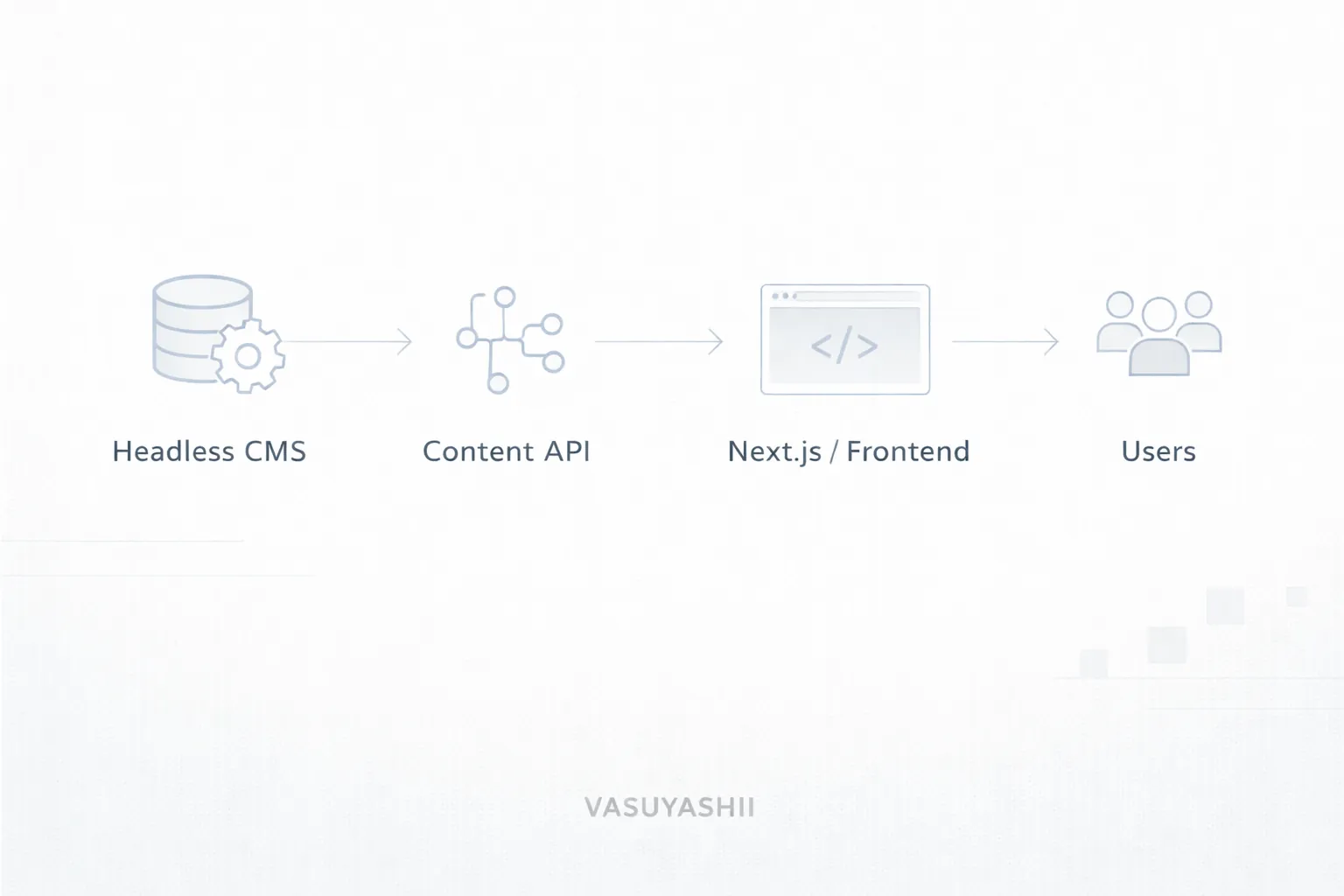
Examples:
Most common:
Other options:
CMS provides content to frontend using:
Common stack:
Editors need to preview drafts before publication. A publish action should then refresh the affected page without rebuilding unrelated content or leaving the CDN stale. Define how draft URLs are protected, how scheduled content works, and what happens when a webhook fails.
The architecture has more boundaries than a traditional single application. Monitor CMS availability, API errors, failed builds, stale content, broken media, and frontend uptime. Assign who can republish, roll back, rotate credentials, and restore content.
Since frontend is optimized, you can achieve:
Headless allows clean:
You’re not limited by theme constraints. You can build:
A headless system can evolve into:
One CMS can power:
This is powerful for growing businesses.
A common fear is: “Headless websites SEO-friendly hote hain ya nahi?”
Yes—headless websites can be extremely SEO-friendly if built correctly. The key is how pages are rendered:
1) Static Generation (SSG) Pages are generated ahead of time. Best for blogs and marketing pages.
2) Server-side Rendering (SSR) Pages are generated on request. Good for dynamic pages.
3) Client-side Rendering (CSR) Not ideal for SEO unless handled carefully.
For SEO-focused businesses: A deliberate mix of static generation, revalidation, and server rendering is often useful. The right choice depends on freshness, personalization, traffic, and failure tolerance; there is no universal rendering mode for every route.
If you’re serious about SEO, also read:
A custom frontend with a headless CMS can be useful when the editing and delivery requirements justify it. This gives:
Headless cost depends on:
Typical ranges:
WordPress can be cheaper initially, but headless often wins long-term for premium businesses.
Treat those figures as planning ranges, not a quotation. Content migration, preview, localization, permissions, search, forms, integrations, accessibility, analytics, and support can change both price and timeline. Compare total ownership over at least two years, including CMS subscriptions, hosting, monitoring, developer maintenance, and editor training.
A headless build becomes difficult when content is modeled around one page design rather than reusable meaning. Define:
Do not give every editor unrestricted schema access. A content change should not be able to break global navigation or remove required metadata without review.
Test failure behavior before launch:
| Failure | Expected behavior |
|---|---|
| CMS API is temporarily unavailable | Previously generated public pages remain available where possible |
| Publish webhook fails | Editor sees failure and can retry without duplicate updates |
| Content field is missing | Build or validation fails clearly, or an approved fallback appears |
| Slug changes | Old URL redirects directly to the approved new URL |
| CMS token is rotated | Frontend recovers through documented secret and deployment procedure |
| Bad content is published | Team can roll back content or deployment quickly |
Headless performance comes from architecture and disciplined delivery, not from the label. An uncached API waterfall, oversized JavaScript bundle, unoptimized media library, or delayed client rendering can still produce a slow site.
1) Not planning content models properly 2) Building frontend without SEO metadata rules 3) No internal linking strategy 4) Making everything dynamic (slower) when static would work 5) Not handling canonical URLs 6) Over-engineering simple sites
Headless should be clean, not complicated.
Define:
Headless shines when your content is structured.
Blogs and static pages should be pre-rendered for speed.
Every blog should link to:
Useful links:
Use WebP + compression to keep speed high.
Headless may be too much if:
For small static sites, WordPress or simple custom site can be enough.
Headless can also be the wrong choice when the organization has no owner for CMS configuration, frontend releases, monitoring, and vendor contracts. Architecture should reduce business risk, not create a permanent dependency that the team cannot operate.
No. It creates more frontend control, but rendering, JavaScript, media, APIs, cache policy, and third-party scripts still determine performance.
No. Search-friendly HTML, stable URLs, metadata, canonical rules, internal links, sitemaps, structured data, and content quality must still be implemented and tested.
Yes, if the CMS models, preview, permissions, and publishing workflow are designed for them. That workflow is part of the project scope.
Start with a content inventory and mapping sample. Migrate a small set, verify fields, URLs, relationships, media, redirects, and SEO output, then run the full migration.
Compare editing workflow, content model, API limits, permissions, preview support, media handling, localization, export, hosting, support, and long-term cost against real requirements.
This guide explains architecture choices and does not claim that headless guarantees rankings, speed, conversion, or lower lifetime cost. Tool examples are options, not endorsements. Final recommendations require a verified content inventory, editing workflow, integration map, budget, security needs, and support owner.
Headless architecture is best when you want:
If your business plans to grow into: dashboards, automation systems, or SaaS— headless is a smart foundation.
If you want a premium headless website (Next.js + CMS) that is fast, SEO-ready, and scalable, we can build it professionally.
Related Articles
March 20, 2026
Compare the best CMS for business and SaaS websites by editing workflow, design speed, SEO control, security, integrations, ownership, and migration risk.
Read article
March 20, 2026
Evaluate 2026 website trends by business value: performance, accessibility, AI workflows, content operations, analytics, privacy, security, and maintenance.
Read article
March 14, 2026
Website development guide for businesses covering planning, sitemap, UI/UX, tech stack, timeline, cost, SEO, performance, and lead generation.
Read article
March 15, 2026
Learn when a business website adds trust, search visibility, lead qualification, measurement, and control beyond social media and marketplace profiles.
Read article