
March 25, 2026
SaaS Development Services: MVP to Scale (2026)
Understand SaaS development services in 2026: MVP scope, multi-tenant architecture, onboarding, billing, scale planning, and the key factors that affect cost.
Read articlePublished Updated
Plan secure SaaS architecture with tenant isolation, authentication, database patterns, billing, jobs, caching, observability, and practical scaling decisions.
SaaS products look simple on the surface: users sign up, log in, and use the software. But behind the scenes, a SaaS system is built using a specific architecture so that it can:
A practical SaaS architecture separates public marketing pages, authenticated product workflows, tenant-scoped data, background jobs, billing events, file storage, monitoring, and administration. The first release does not need microservices. It needs clear boundaries, reliable tenant isolation, recoverable data, and an architecture that the current team can operate.
For most early SaaS products, a modular monolith with a relational database, queue-backed jobs, object storage, and explicit tenant scoping is easier to test and maintain than many small services. Split services later when deployment independence, workload isolation, compliance, or team ownership creates a real need.
Before choosing a pattern, answer:
The database comparison guide helps select the data layer. Use the RBAC security guide for authorization, the subscription billing guide for commercial state, and web application development for implementation planning. A focused scope can be discussed through contact.
The sections below explain the core layers, three common database-isolation patterns, authentication and authorization boundaries, background work, billing events, observability, scaling decisions, and a first-party tenant-boundary example.
SaaS architecture is the structure of your SaaS system—how all components connect to deliver the product reliably.
A SaaS architecture includes:
Architecture is important because a SaaS product is not just one project—it’s a platform that must run every day, for many customers.
A normal web app is often built for one company:
A SaaS product is built for many customers:
So SaaS architecture must include multi-tenant design, scaling, and safety.
If you want the full product development view: What is SaaS Product Development?
At a high level, most SaaS products look like this:
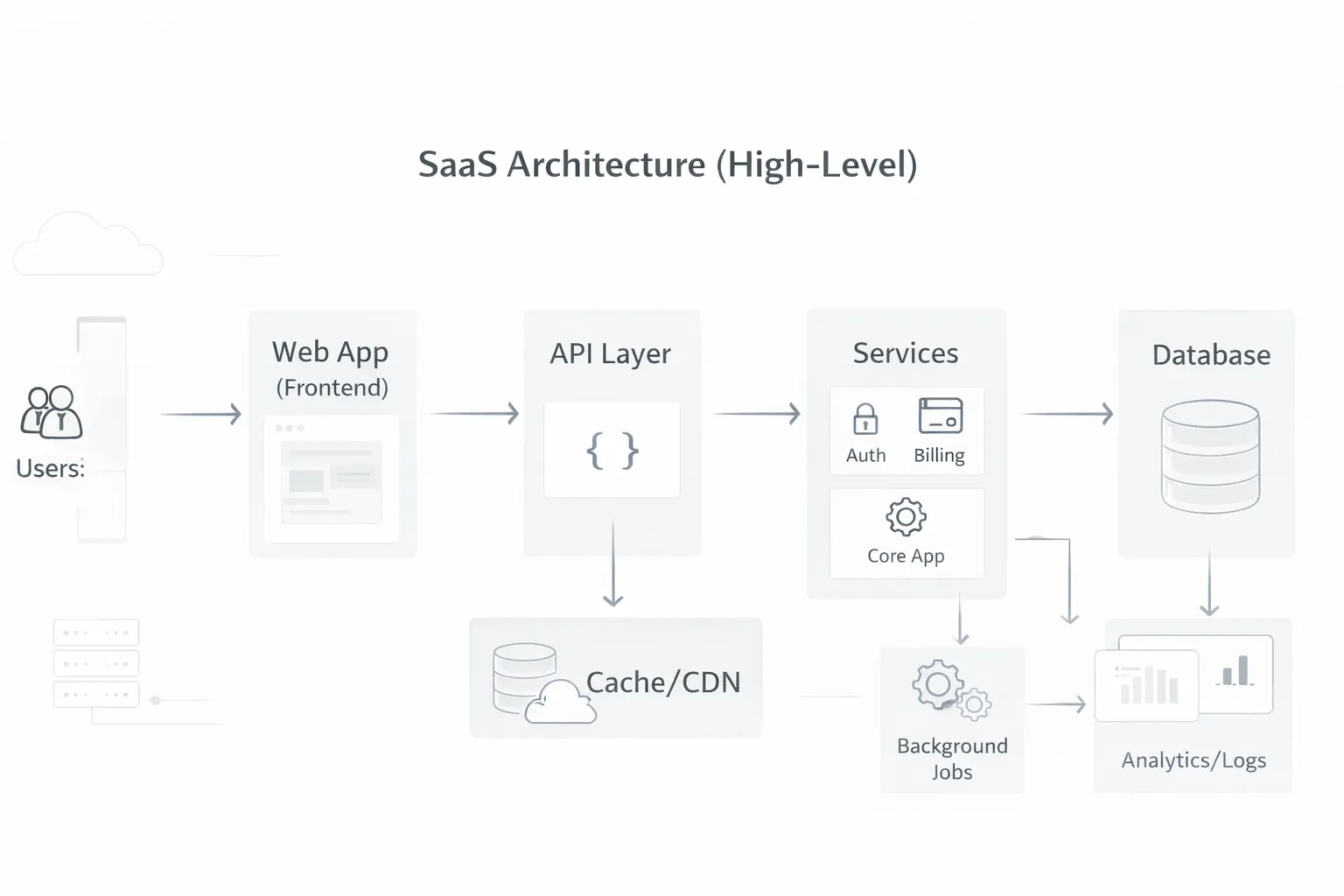
1) Users (customers on web/mobile) 2) Frontend web app (Next.js/React UI) 3) API layer (backend endpoints) 4) Services (auth, billing, product features) 5) Database (tenant data storage) 6) Background jobs (emails, reports, automation) 7) Observability (logs, metrics, monitoring) 8) CDN/cache (performance)
In SaaS, users belong to an organization (tenant). Example:
Each has separate users and data.
This depends on your SaaS type:
For your team:
Multi-tenant means:
But multi-tenant also increases risk:
So tenant design must be clean.
There are 3 common patterns:
One database, same tables, every record has tenantId.
Example:
tenantId columntenantId✅ Pros:
⚠️ Cons:
Same DB server, but each tenant has separate schema. Used in some enterprise systems.
✅ Better isolation ⚠️ more complexity
Each tenant has its own DB.
✅ Strong isolation ⚠️ expensive and complex Best for enterprise clients.
Most SaaS startups use Pattern 1 and add strong security rules.
Methods:
Role-based access control (RBAC) is common:
Best practice: authorization must be enforced server-side, not only UI.
SaaS backend provides APIs like:
/api/users/api/orders/api/products/api/reportsArchitecture choices:
Recommendation: start with a clean monolith, then modularize later.
You should not do heavy tasks inside user requests.
Background jobs handle:
Common tools:
SaaS must feel fast.
Common performance layers:
Examples:
A SaaS product must detect issues early.
Audit logs help track:
Billing is a core SaaS module.
Billing system includes:
Billing must be reliable because it affects revenue.
Security layers:
If you want security practices: Website Security Best Practices
Scaling is done in stages.
Rule: scale based on real usage, not imagination.
1) No tenant isolation 2) Doing heavy tasks in request-response 3) No audit logs 4) No background job system 5) Building microservices too early 6) Weak permissions model 7) No performance plan 8) No backup strategy
If you’re building a SaaS in 2026, a safe blueprint is:
This blueprint balances speed and scalability.
The VASUYASHII Business Suite documents a React frontend, Django REST API, PostgreSQL database, JWT authentication, multi-company SaaS structure, backend PDF generation, and company-scoped APIs. Its current modules include clients, vendors, products, invoices, purchases, payments, expenses, reports, backup/restore, and team access where configured.
The important architecture lesson is not the framework list. It is the boundary: one user may manage multiple companies, while invoices, payments, dues, purchases, and stock history remain company-specific. Every API query, background task, report, PDF, import, export, and restore action must resolve the authorized company instead of trusting a company ID supplied by the browser.
A practical tenant-isolation test should include:
Expected denial behaviour belongs in automated tests and audit logs. Hiding another company's record in the interface is not an authorization control.
The product also demonstrates why a modular monolith can be sensible early. Billing, stock, purchases, PDF generation, and reporting share business data and transaction boundaries. Splitting them into separate services before workload or team ownership requires it would add deployment, synchronization, tracing, and failure-recovery complexity.
Architecture decisions become operational obligations after launch. Use the SaaS maintenance plan pricing and scope guide to define monitoring, incident severity, backups, release control, capacity, exclusions, and handover for the system described here.
Usually no. A well-structured monolith is easier for a small team to test, deploy, and operate. Split services when measured workload, security isolation, or independent team ownership requires it.
Enforce them in backend authorization and data access for every request and job. Frontend filtering can improve usability but cannot protect tenant data.
It can be, when tenant ownership is mandatory, indexed, tested, and included in every query and uniqueness rule. Higher-isolation customers may justify separate schemas or databases.
Back up the database, required files, configuration, and the information needed to restore relationships. Test restoration at tenant and full-system levels where the architecture supports it.
Use a queue when work is slow, retryable, scheduled, or should not block a user request, such as PDFs, imports, emails, reports, or provider synchronization.
Review errors, slow queries, queue failures, tenant-denial tests, backup restores, support incidents, infrastructure cost, and actual growth constraints before adding complexity.
SaaS architecture is about building a platform that:
If your SaaS foundation is strong, growth becomes easier.
If you want to build a SaaS product with clean architecture, multi-tenant security, subscription-ready billing, and scalable performance, VASUYASHII can help.
👉 WhatsApp: Chat on WhatsApp
👉 Contact: Send your requirement
Related Articles
March 25, 2026
Understand SaaS development services in 2026: MVP scope, multi-tenant architecture, onboarding, billing, scale planning, and the key factors that affect cost.
Read article
March 22, 2026
Understand SaaS product development from customer problem and MVP scope through tenancy, onboarding, billing, security, metrics, release and ongoing operations.
Read article
March 25, 2026
Customer portal development guide for 2026: secure login, roles, data access, portal features, integrations, and best practices for self-service experiences.
Read article
March 22, 2026
Evaluate SaaS benefits and trade-offs across cost, deployment, access, updates, security, integration, data ownership, vendor risk and business fit.
Read article