
May 13, 2026
Mobile App Audit Checklist: Performance, UX and Security
Audit a mobile app for launch speed, crashes, UX, accessibility, API failures, analytics, permissions, security, store readiness, and release quality.
Read articlePublished Updated
Audit a business web app across access control, workflows, data integrity, backups, UX, reports, integrations, performance, and release readiness.
A web app audit should answer a practical question: can real users complete important work without exposing data, creating inconsistent records, or depending on undocumented workarounds? A visual review alone cannot answer that. The audit must follow records through login, permissions, creation, approval, reporting, export, backup, and recovery.
This checklist is designed for Indian SMEs using an admin dashboard, customer portal, CRM, inventory system, GST billing app, booking platform, or internal operations tool. It separates security, UX, data integrity, and operational readiness so owners can approve fixes in a sensible order.
By Tushar C. (Founder, VASUYASHII). Editorial review focuses on business-app workflows, company-scoped access, data integrity, handover, and testable acceptance criteria.
A useful web app audit tests five layers:
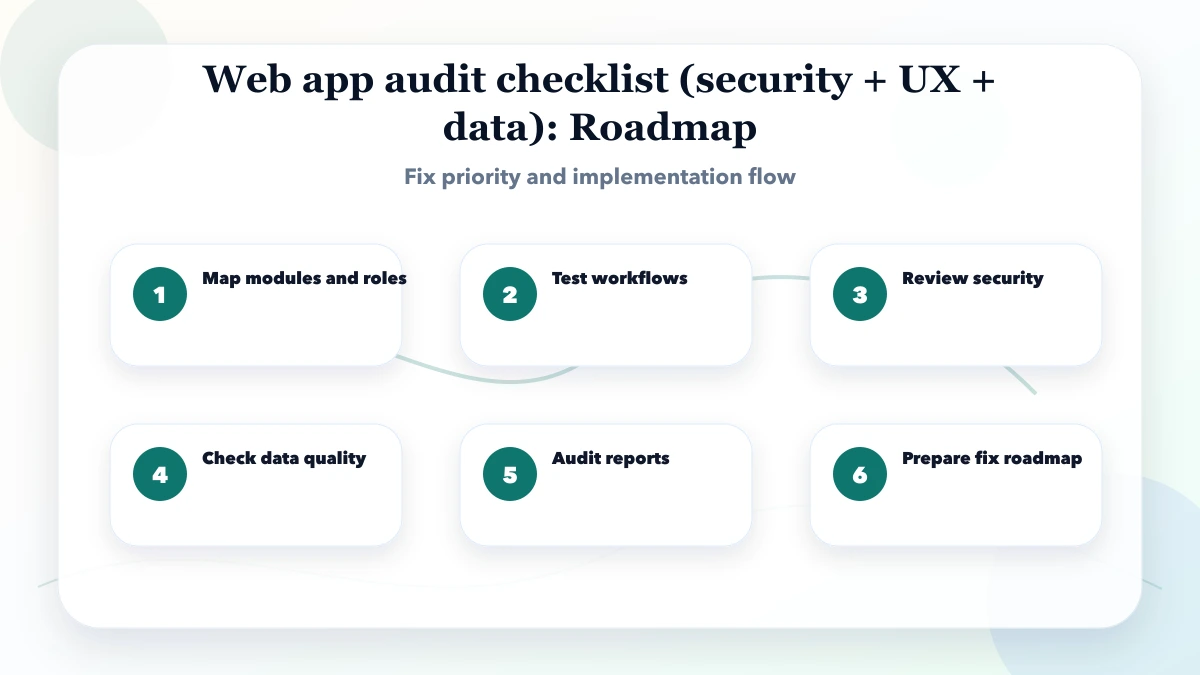
The output should not be a long list of opinions. Every finding needs evidence, severity, affected role, business impact, owner, recommended fix, and a verification method.
Create test journeys before opening browser developer tools. A billing and inventory app might need these journeys:
Use realistic but non-production test data. Include a normal case, a boundary value, an invalid input, a duplicate, a permission failure, and a retry after network interruption. This exposes problems that a screenshot review misses.
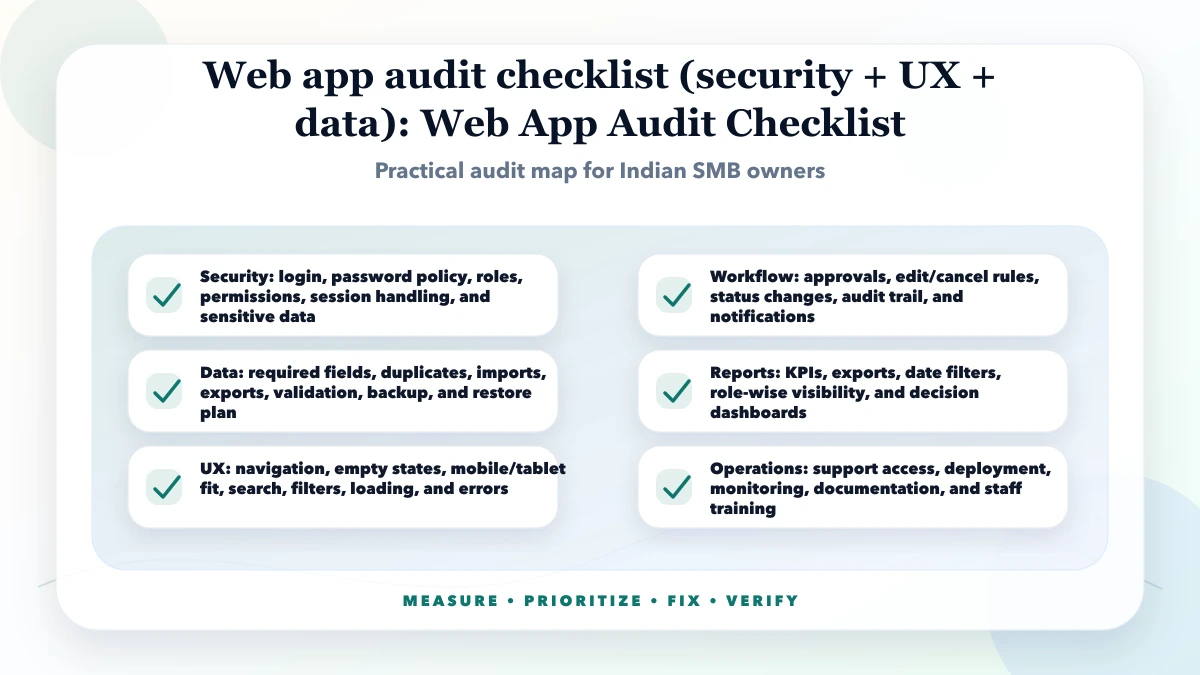
Authentication is only the first layer. A logged-in user can still see or change the wrong data if object-level permissions are missing.
| Check | Test | Pass condition |
|---|---|---|
| Session handling | Sign out, reuse an old protected URL, and test token expiry | Protected data is unavailable after session expiry |
| Role permissions | Use owner, manager, and staff accounts on the same records | Each role sees only approved actions |
| Tenant isolation | Change record or company identifiers in requests | Cross-company access is rejected server-side |
| Sensitive exports | Export customer, payment, or inventory data | Permission and company scope are enforced |
| Public sharing | Open a document link in a private browser | Only the intended public flow is exposed |
| Audit trail | Edit or cancel a high-impact record | Actor, time, and action are traceable where required |
Do not rely on hidden buttons as access control. The API must reject a forbidden action even if a user sends the request manually. Check rate limits and abuse controls on login, OTP, password reset, and public verification endpoints. Review secrets, environment variables, error responses, and logs so credentials or personal information are not exposed.
For deeper planning, use the role-based web app security guide and permission matrix template.
Data problems become expensive because they affect reports, customer communication, and owner decisions. Test the rules that make records trustworthy:
Reconcile one record manually from source to report. For an invoice, calculate line values, tax, total, payment, due, stock movement, client history, and summary report. A dashboard number is not trustworthy until it can be traced back to source records.
A screen can look polished while the workflow remains slow. Time a new or infrequent user completing the most important tasks. Record where they hesitate, backtrack, or ask for help.
Check:
Do not count clicks in isolation. A four-step flow with clear context can be safer than a two-step flow that causes mistakes. Evaluate completion time, error rate, support questions, and confidence.
Owners often approve software because a dashboard looks impressive. Audit whether every KPI has a precise definition and traceable source.
For each report, document:
Use a small reconciliation sheet with known totals. If sales, purchases, stock value, expenses, or dues cannot be reproduced from selected source records, treat the report as unverified.
Payment gateways, WhatsApp, email, webhooks, and third-party APIs fail in ways that normal UI tests do not cover. Test duplicate callbacks, delayed responses, invalid signatures, provider timeouts, and retries. A retry must not create a second invoice, payment, message, or order.
Decide which system owns each field. If a CRM and billing system both store customer status, define the source of truth and conflict rule. Log enough non-sensitive context to diagnose failures. Provide an operations view for failed or pending jobs instead of making staff ask a developer to inspect production logs.
Read API integration services and the webhook integration guide when the audit includes connected systems.
The current VASUYASHII Business Suite provides an inspectable example of the boundaries this checklist should test: JWT-authenticated company-scoped APIs, multi-company data separation, clients, vendors, products, GST invoices, purchases, payments, expenses, reports, backend PDF generation, secure WhatsApp PDF sharing, and backup/restore with dry-run validation.
That is first-party implementation context, not proof that every possible security control has been independently certified. An audit of this type would still verify tenant isolation with separate accounts, permissions on every object endpoint, calculation consistency, PDF access, backup completeness, restore behavior, and mobile task completion. Advanced accounting, payroll, manufacturing BOM, direct e-invoice/e-way-bill integration, and full CRM are outside the product's currently stated scope and should not be marked as failed modules merely because they are not promised features.
Other current services can be inspected for billing, inventory, barcode, and restaurant-ordering workflow examples. Demo websites are fictional design demonstrations, not customer case studies or security evidence.
Score each finding on four factors from 1 to 5:
Fix confirmed access-control, data-loss, calculation, and broken-core-workflow issues first. Then address repeated user friction, report mismatch, reliability, and performance. Cosmetic polish comes after the app is safe and dependable.
An actionable finding looks like this: "A staff user can export clients from another company by changing the company identifier. Reproduced with two test companies. Block at queryset and object-permission layers, add an automated isolation test, and verify a 403 response." That is more useful than "permissions need improvement."
A professional audit handover should include:
Ask for screenshots or request traces with sensitive values removed. Keep destructive tests on staging or approved test data. If production verification is necessary, agree on timing, backups, and rollback before starting.
Audit before launch, after a major module or permission change, before migrating important data, and when users report unexplained totals, access problems, or repeated workflow confusion.
Yes. A smaller user count does not remove risks around customer data, payments, staff access, backups, or cross-company exposure. Scope the audit to the real risk instead of copying an enterprise checklist.
A focused module can take a few days; a multi-role, multi-company app with integrations may take several weeks. Test-account readiness, documentation, data complexity, and access to staging affect the schedule.
At minimum, review integrity constraints, relationships, company scope, backup coverage, restore behavior, migration history, and the queries behind high-impact reports. Direct production access should be controlled and logged.
Use the database indexing guide for business apps when a measured query or report is slow, and the business app backup strategy when recovery coverage or restore evidence is unclear.
A prioritized, reproducible fix list with acceptance tests. A large report without evidence or verification steps is hard to implement safely.
Yes, subject to agreed scope and access. Start with one workflow, role matrix, and data-risk review. See web application services, software development, or contact VASUYASHII with the modules and current problems.
Choose one high-impact workflow and provide its roles, inputs, status changes, reports, integrations, and known complaints. VASUYASHII can turn that evidence into a focused audit and remediation scope without redesigning unrelated parts of the application.
Related Articles
May 13, 2026
Audit a mobile app for launch speed, crashes, UX, accessibility, API failures, analytics, permissions, security, store readiness, and release quality.
Read article
May 17, 2026
Use this web app performance checklist for Core Web Vitals, APIs, databases, JavaScript, tables, background jobs, monitoring, budgets, and regression tests.
Read article
May 17, 2026
audit logs for admin panels: practical 2026 guide with checklist, cost, roadmap, tools, mistakes, FAQs, and next steps for Indian SMBs today safely today.
Read article
May 25, 2026
Migrate Excel data to CRM with source profiling, field mapping, deduplication, trial imports, reconciliation, cutover, rollback and validation.
Read article