
April 6, 2026
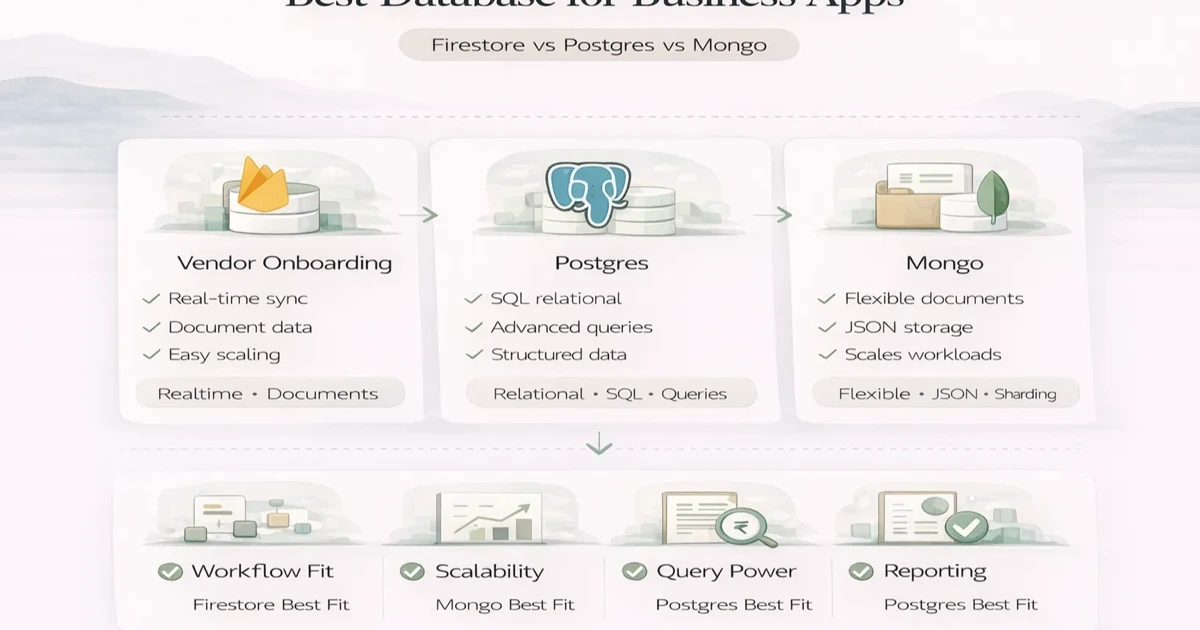
PostgreSQL vs Firestore vs MongoDB for Business Apps
Compare PostgreSQL vs Firestore vs MongoDB for business apps by transactions, real-time sync, reporting, document models, cost, migration, ownership, and scale.
Read articlePublished Updated
Learn database indexing through CRM, billing, inventory, and reporting queries, with composite-index order, trade-offs, EXPLAIN checks, and rollout steps.
Database indexing helps a CRM, billing system, inventory app, or admin dashboard find rows without scanning more data than necessary. But an index is not a universal speed switch. It is a data structure chosen for a specific query pattern, and it adds storage plus work whenever related data is inserted, updated, or deleted.
The correct process starts with a measured slow query, its filter and sort pattern, the number of rows returned, and an execution plan. Adding indexes to every column can make writes slower while failing to improve the screens users actually wait for.
Index columns used repeatedly in selective filters, joins, and ordering, but design the index for the complete query. Use execution-plan tools such as PostgreSQL EXPLAIN/EXPLAIN ANALYZE to compare estimated and actual work where safe. Review write overhead, storage, duplicate indexes, lock/deployment behaviour, and production-like data before rollout.
If database performance is part of a wider product problem, start with a web application audit and build review rather than treating one index as the entire fix.
Imagine an invoice list filtered by company, status, and date, ordered newest first:
SELECT id, invoice_number, customer_id, total, due_amount, issued_at
FROM invoices
WHERE company_id = $1
  AND status = 'unpaid'
  AND issued_at >= $2
ORDER BY issued_at DESC
LIMIT 50;
An index only on status may not help much if most invoices share a small set of statuses. An index designed around the tenant/company boundary and common date access may be more useful. The exact choice depends on data distribution, database engine, query plan, and other workload needs.
This illustrates the main rule: start from real queries, not column names.
Without a useful index, the database may scan many rows, test the filter, sort matches, and then return a small page. With a suitable index, it may navigate directly to a narrower range and sometimes read rows in useful order.
The trade-offs are:
Index design is workload design.
| Screen/workflow | Common access pattern | Signals to inspect |
|---|---|---|
| Customer search | Company + phone/email/name | Search type, normalisation, result limit |
| Invoice list | Company + status + date order | Tenant boundary, selectivity, pagination |
| Stock ledger | Company + product/location + event time | High row volume, append rate, running totals |
| Due report | Company + due status/date/customer | Derived values, joins, sorting |
| Activity timeline | Entity ID + created time | Large history and descending order |
| Admin audit log | Company/user/action + time | Write volume, retention, investigation filters |
| Background job | State + scheduled time | Frequent polling and update contention |
A single-column index can help when one field is frequently filtered or joined and sufficiently selective. Typical candidates include stable foreign keys and unique business identifiers.
But selectivity matters. A boolean such as is_active may divide a table poorly if almost every row is active. The optimiser may correctly choose a sequential scan. Do not judge an index only by its existence.
A composite index contains multiple columns in a defined order. The order should reflect common equality filters, ranges, and sorting, while also considering engine behaviour and query frequency.
For a multi-company app, many queries begin with company_id. A possible index for the invoice example could start with company and status, then date. This does not mean every query should use that exact order. A report filtering company and customer but not status may need a different access path.
Avoid creating one composite index for every filter combination. Identify a small set of high-value query shapes and check whether one index can support several of them.
Unique indexes or constraints enforce rules such as:
Define the business scope correctly. A globally unique invoice number may be wrong if separate companies use independent series. Database constraints should match application validation and error handling.
Some databases support partial indexes that cover rows matching a condition, such as open jobs or unpaid invoices. They can be useful when the active subset is small and queries match the condition predictably.
Expression indexes can support searches on a normalised value, such as a lower-cased email. Generated/normalised columns may sometimes be easier to reason about across application code.
These features are engine-specific. Verify current official documentation and test the exact query; do not copy syntax or assumptions between PostgreSQL, MySQL, SQLite, or managed variants.
Some engines allow an index to include extra output columns so a query can be satisfied with fewer table reads. This can help a heavily used list, but wide indexes consume storage and increase write cost.
Use this optimisation only after measuring. Selecting every column from a large record usually defeats the purpose; list screens should request the fields they display.
LIKE '%term%' or fuzzy search may not benefit from a normal B-tree index. Product names, addresses, and notes can require full-text search, trigram-like features, a search engine, or a carefully designed prefix strategy.
Choose based on search behaviour:
Do not force every search use case through the same index.
Large admin tables often slow down because they sort wide results and use deep offset pagination. An index aligned with filter and sort can help, while keyset/cursor pagination can avoid repeatedly skipping many rows.
Cursor pagination requires a stable ordering, usually with a tie-breaker such as (issued_at, id). It changes API and interface behaviour, so treat it as a product/API decision rather than a hidden database tweak.
Use the database's plan tools to answer:
EXPLAIN ANALYZE executes a query in PostgreSQL, so use caution with writes and production load. Begin in a safe environment with production-like data, then use approved production diagnostics when needed.
Our implementation review saves the before plan, representative parameters, row counts, query duration distribution, proposed index, after plan, and write/storage impact. This first-party process prevents a one-off fast test from becoming unsupported performance evidence.
A slow screen may come from:
Use application tracing and query logs to identify the actual time. The website and web app performance guide covers the broader path from server to browser.
In a shared-database SaaS application, tenant/company scope appears in most queries and security checks. Indexes frequently need to reflect that scope, but the exact design depends on table distribution and access patterns.
Test a small tenant and a large tenant. Parameter-sensitive plans and highly uneven data can produce different results. Ensure every query is correctly scoped before optimising it; a fast unscoped query is a data-isolation defect.
Stock movements, audit logs, events, and webhook records may receive frequent writes. Every additional index increases write work. Retention, partitioning, archiving, and query requirements should be considered together.
Monitor write latency, storage growth, index bloat or maintenance indicators supported by the engine, and replication impact where applicable.
For a wider launch process, use the web app audit checklist.
Requirements and defaults differ by database. Foreign-key columns are often useful join/filter candidates, but inspect actual constraints, engine behaviour, and queries rather than assuming.
The optimiser may estimate that a scan is cheaper because too many rows match, statistics differ, the query expression does not align, types/collations differ, or another plan is better. Inspect the execution plan.
Yes. They add write, storage, cache, and maintenance cost. The right goal is a balanced workload, not the maximum number of indexes.
Small operational reports can. Heavy analytics may need summaries, read replicas, a warehouse, or scheduled computation. Decide based on freshness, load, and complexity.
After major data growth, new query patterns, schema changes, performance incidents, or workload shifts. Use measured query evidence rather than a fixed calendar alone.
Contact VASUYASHII with the affected workflow, database engine/version, anonymised query and plan, table sizes, traffic pattern, and recent changes. Do not send production credentials or sensitive data.
Create an index only when a measured business-critical query and its execution plan justify it. Verify the improvement against realistic data, understand the write and deployment cost, and retain before/after evidence for future maintenance.
Related Articles
April 6, 2026
Compare PostgreSQL vs Firestore vs MongoDB for business apps by transactions, real-time sync, reporting, document models, cost, migration, ownership, and scale.
Read article
May 17, 2026
Build a business app backup strategy with clear RPO, RTO, scope, encryption, off-site copies, retention, restore drills, evidence, and ownership.
Read article
May 27, 2026
Compare Firebase and MongoDB for business apps across data models, queries, auth, offline use, reporting, cost, security and long-term backend control.
Read article
May 19, 2026
Plan a business data migration with source mapping, trial imports, record reconciliation, cutover checks, tested recovery and clear sign-off ownership.
Read article