
March 26, 2026
ERP Software for Small Businesses: 2026 Guide
ERP software for small businesses guide with modules, roadmap, pricing in India, tech stack, timeline, and cost drivers for phased growth rollout today.
Read articlePublished
Manufacturing ERP for SMEs explained: compare core modules, rollout stages, integrations, costs, controls, and practical implementation decisions in 2026.
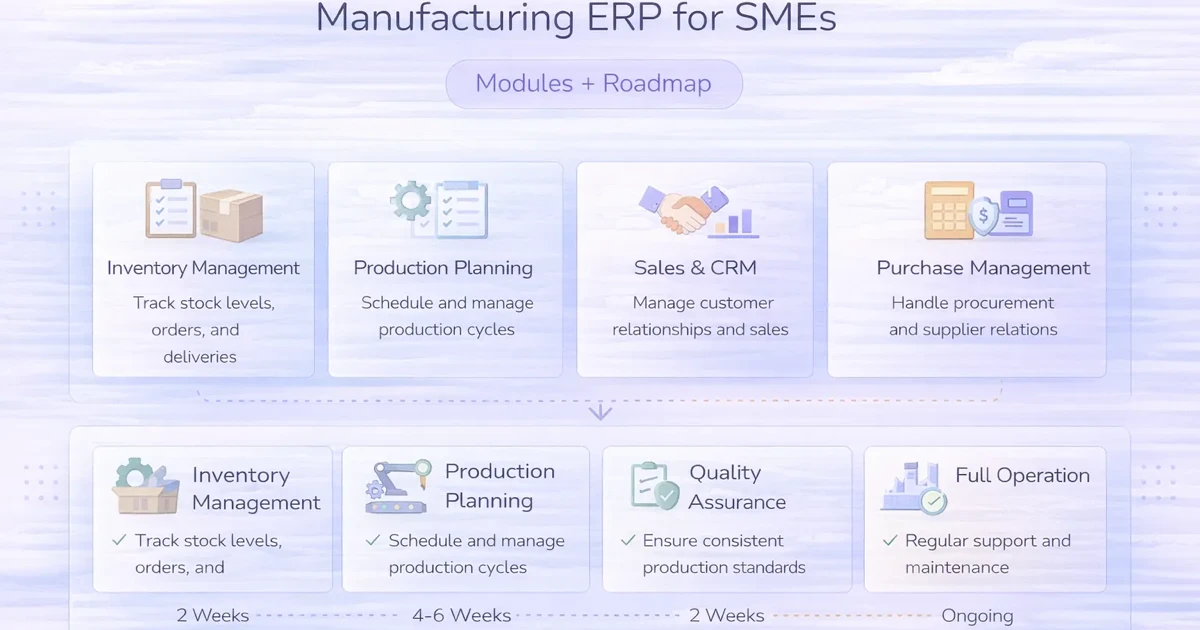
Manufacturing businesses usually reach ERP thinking stage when separate tools stop working together. Purchase is tracked in one place, stock in another, production planning in another, dispatch updates on calls, and billing somewhere else. The owner gets reports, but not a single trusted view of operations.
That is where manufacturing ERP becomes useful. Not as a giant enterprise dream project, but as a phased operating system for core workflows: materials, production, stock, dispatch, billing, and reporting.
This guide explains which modules matter most for SME manufacturers, what rollout order usually works best, how much it costs, and why phased implementation is usually smarter than trying to build everything together.
For most SME manufacturing businesses, the best first ERP modules are:
Typical pricing for a phased custom manufacturing ERP:
₹3.5 lakh to ₹6 lakh₹6 lakh to ₹10 lakh₹10 lakh to ₹18 lakh+The right first step is usually not full enterprise ERP. It is a phase-one core system built around the biggest operational bottlenecks.
You likely need it when:
ERP makes sense once coordination pain starts costing time, money, or delivery reliability.
Related reading:
Without clean master data, ERP reports stay weak.
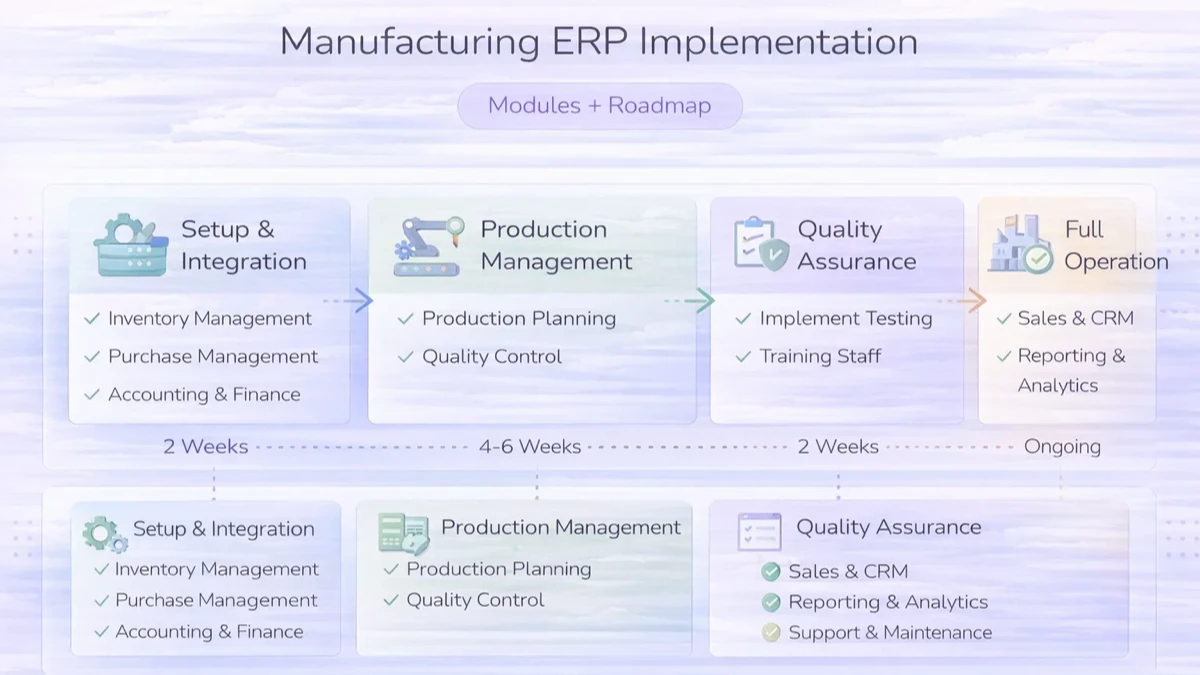
Start with:
This creates immediate operational visibility.
Add:
Add later if needed:
This phased approach reduces rollout stress and makes adoption easier.
₹3.5 lakh to ₹6 lakhUsually includes:
₹6 lakh to ₹10 lakhUsually includes:
₹10 lakh to ₹18 lakh+Usually includes:
The best budget logic is phase-wise. Phase one should solve real pain, not chase a perfect all-in-one launch.
A practical manufacturing ERP stack:
Next.js frontend for dashboards and formsNode.js backend for workflow rulesPostgreSQL for transactional and reporting dataThe workflow model matters more than tool branding. A clean process design creates the real value.
Typical timeline:
3 to 5 weeks: phase-one core ERP6 to 10 weeks: growth ERP with production layer10+ weeks: advanced multi-module rolloutTimeline depends on:
Manufacturing ERP cost changes based on:
A common mistake is trying to automate unclear processes. First standardize the process. Then software works better.
If production, stock, dispatch, and billing updates still depend heavily on calls and spreadsheets, the right first move is a phased ERP core, not a giant software wish list.
No. SMEs benefit too once operational coordination becomes difficult across purchase, stock, production, and billing.
Purchase, stock, billing linkage, dashboards, and basic production tracking usually come first.
Only if that is a real operational bottleneck. Many SMEs start with simpler controls first.
Yes. That is often the best way to launch and train teams.
If scope is clear, a usable phase-one version can often launch in 3 to 5 weeks.
If process complexity is low, SaaS may work. If workflows, reports, or approvals are specific, custom is often better.
Stock visibility, purchase control, dispatch clarity, and faster reporting usually create the earliest gains.
Trying to build every department's wish list into the first release.
If you want ERP scoped around real manufacturing flow, the right first step is to identify the two or three connected workflows causing the biggest daily breakdowns and build phase one around them.
Related Articles
March 26, 2026
ERP software for small businesses guide with modules, roadmap, pricing in India, tech stack, timeline, and cost drivers for phased growth rollout today.
Read article
May 15, 2026
ERP for manufacturers features and cost: practical 2026 guide with features, cost, timeline, tech stack, mistakes, FAQs, proof, and next steps for Indian SMBs.
Read article
May 24, 2026
Use a phased small-business ERP implementation roadmap covering process ownership, master data, migration, pilots, controls, training, and go-live support.
Read article
May 26, 2026
manufacturing production tracking system: practical 2026 guide with features, INR pricing, roadmap, tech stack, mistakes, FAQs, and Indian SMB tips today.
Read article