
March 21, 2026
Common Website Development Mistakes (2026)
Common website development mistakes in 2026 that hurt SEO and leads, including slow speed, weak UX, bad forms, duplicate content, and no tracking.
Read articlePublished Updated
Website development process explained for 2026 with discovery, sitemap, wireframes, UI design, SEO setup, speed, QA, launch, and maintenance.
Most businesses think website development means “make a design and upload it.” In reality, a high-quality business website is built like a product—with a clear process. That process determines whether your website becomes a lead generator or just a brochure that no one uses.
In 2026, website expectations are higher:
That’s why the development process matters. If the process is weak, the final website will be slow, confusing, and hard to scale. If the process is strong, the website will keep improving your business month after month.
This guide explains the complete website development process step-by-step—from planning to launch—using a professional workflow.
Here is the complete process:
1) Discovery & Goals 2) Sitemap & Structure 3) Wireframes 4) UI/UX Design 5) Development (Frontend + Backend if needed) 6) Content + SEO Setup 7) QA Testing + Performance Fixes 8) Launch + Tracking + Maintenance
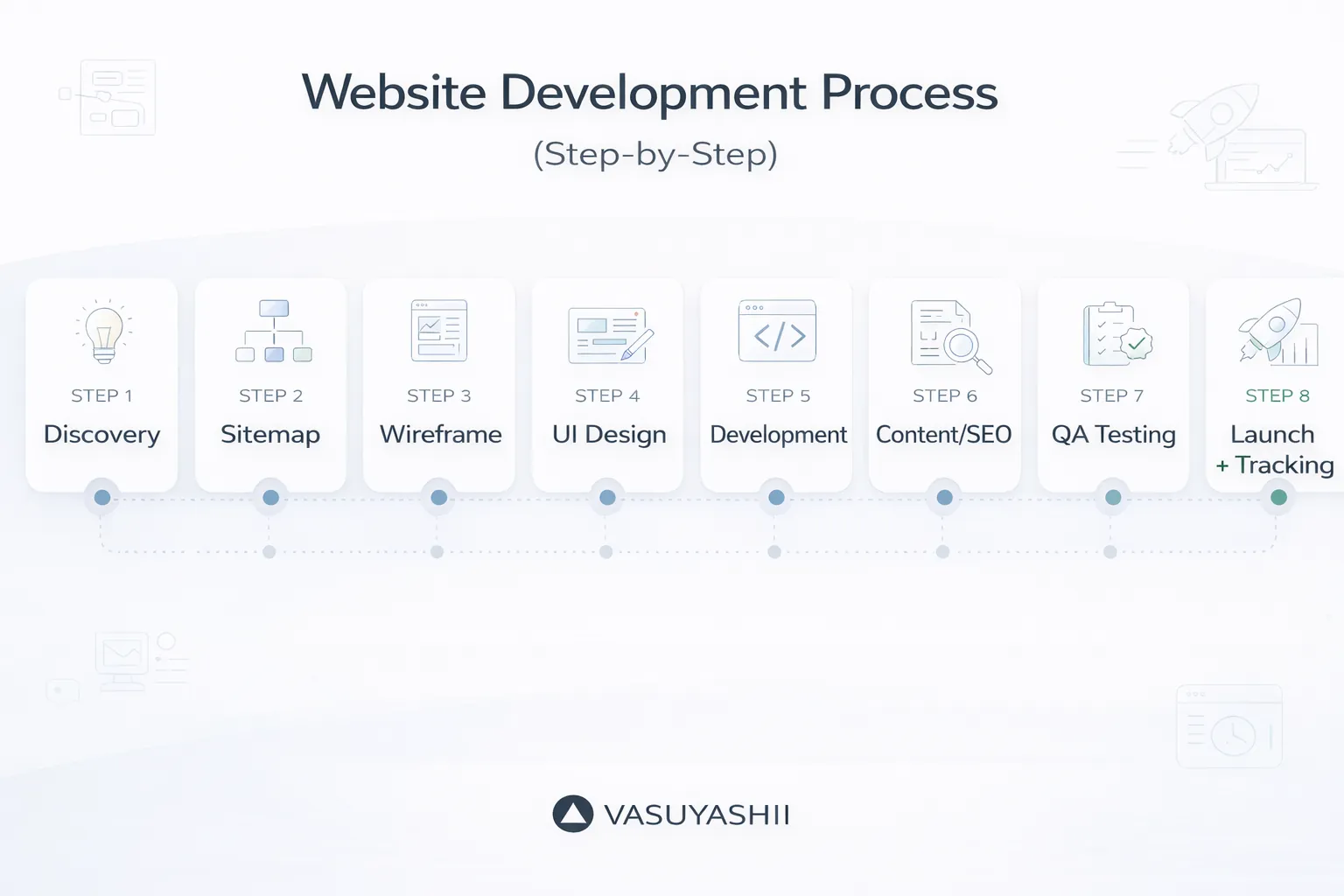
Now let’s break each step into details.
There is no required universal count. Some teams combine content and SEO with design or development, or combine launch with maintenance, producing seven stages. This guide keeps them visible as eight steps because content readiness, technical SEO, production launch and ongoing ownership have different acceptance checks.
A seven-stage version of the same workflow is:
The labels matter less than having an owner, deliverable and approval condition for every stage.
Discovery is where the project is decided. A website that has unclear goals usually fails.
For most business websites, goals are:
Ask:
Be very clear:
A simple “Website Brief” document:
This document saves huge rework later.
Sitemap means page structure. This is where SEO begins.
If you want to rank on Google, create separate service pages like:
/services/web-applications/services/saas-development/services/automation-solutionsEach page targets a separate keyword cluster.
A final sitemap list, for example:
Wireframes are simple layout sketches (no colors yet). They ensure:
Wireframing avoids the mistake of “design first, logic later.”
Now you create the real design:
In 2026, premium UI is mostly:
Always design for mobile first because most users will visit your website on a phone.
A good design should include:
If you want deeper UI/UX guidelines: Website UI/UX Best Practices
Development includes turning the design into a working website.
For basic websites, backend may be minimal (contact form). For web apps, backend includes:
If you’re building portals or dashboards: Web Application Development Guide
This is where your website becomes “SEO-ready.”
If you want deeper SEO foundation: SEO Friendly Website Development
Content should be:
QA is where most cheap websites fail. Testing prevents:
If you want performance guide: Website Speed Optimization Guide
Launch is not the end. It’s the beginning of growth.
Track:
Monthly maintenance includes:
Related: Website Maintenance Guide Website Security Best Practices
Typical timelines:
| Stage | Expected deliverable | Approval evidence |
|---|---|---|
| Discovery | Goals, audience, scope and dependencies | Approved website brief |
| Architecture | Page inventory, navigation and URL plan | Approved sitemap with page owners |
| Wireframe | Content hierarchy and key user journeys | Responsive layout review |
| Design | Visual system and component states | Approved desktop and mobile screens |
| Development | Working staging site and integrations | Demonstrated acceptance scenarios |
| Content and SEO | Final copy, metadata, links and crawl controls | Content approval and technical checklist |
| QA | Defect record, device checks and performance review | Critical issues closed or documented |
| Launch and handover | Production release, tracking and account access | Smoke test and delivery checklist |
Do not start the next high-cost stage while a blocking deliverable remains ambiguous. This reduces revision loops without forcing every small decision into a long approval process.
Assume a service business needs Home, Services, About, FAQ and Contact pages with WhatsApp, a contact form and lead-event tracking.
This sequence can be shortened when inputs are ready, but skipping ownership or acceptance usually moves the same work into a more expensive correction stage.
1) No discovery brief 2) Design before sitemap 3) No mobile-first UI 4) No SEO structure 5) No testing 6) No tracking 7) No maintenance plan
A professional website process protects budget and SEO. The important part is not only design approval. The process should move from goals to sitemap, wireframes, content, development, QA, launch, and tracking.
Before launch, confirm:
Content approval and unclear scope usually cause the most delays.
SEO structure should be planned before development so URLs, headings, internal links, and metadata are not patched late.
Discovery. Confirm the business outcome, audience, offer, constraints, proof, content owner and conversion path before selecting pages or visual style.
At minimum: approved business details, services or products, target customers, brand assets, proof that can be published, required policies, contact destinations, access ownership and one person responsible for decisions. Missing content should be identified as a deliverable, not silently replaced with filler.
Yes. A phased launch can start with a coherent core and add approved services, resources or integrations later. Preserve the URL plan, ownership and acceptance rules so later phases do not undo earlier SEO or tracking work.
It depends on scope and approval speed. Discovery and architecture may take days for a focused site; design, content and development usually take longer. Track dependencies and acceptance dates instead of applying one fixed timeline to every project.
Useful links: website development trends for buyers, startup website planning, common website development mistakes, web application services, services, and contact.
During technical planning, use the frontend vs backend business guide to assign interface states, server-side rules, data ownership, and acceptance checks before implementation starts.
If you want a website that is fast, SEO-ready, and built for lead generation—with a clean professional workflow—we can build it.
👉 WhatsApp: Chat on WhatsApp 👉 Services: Web Applications Services 👉 Services: View our services 👉 Contact: Contact page
Related Articles
March 21, 2026
Common website development mistakes in 2026 that hurt SEO and leads, including slow speed, weak UX, bad forms, duplicate content, and no tracking.
Read article
March 17, 2026
Responsive website development explained with mobile-first design, breakpoints, images, Core Web Vitals, SEO impact, mistakes, and best practices.
Read article
May 19, 2026
Follow an eight-phase software development process for SMEs covering discovery, scope, UX, build, testing, migration, training, launch, and support.
Read article
March 29, 2026
Plan a Faridabad industrial AMC website with equipment scope, site-audit requests, maintenance coverage, safety documents, renewals, and lead routing.
Read article