
March 27, 2026
Restaurant Ordering System: QR Menu and Orders
Plan restaurant QR ordering: menu and cart, table context, staff handoff, payment and POS boundaries, cost drivers and a sample-order acceptance checklist.
Read articlePublished Updated
Learn how a restaurant kitchen display system works, from order routing and station screens to expo handoff, offline planning, pricing and rollout tests.
Restaurants often invest in guest-side technology first: QR menus, online ordering, or billing improvements. But if the kitchen still depends on paper chits, shouted updates, or informal coordination, service quality keeps hitting the same ceiling. That is where a kitchen display system matters.
A Kitchen Display System, or KDS, is the screen-based workflow that shows incoming orders, routes them to the right preparation area, tracks preparation status, and helps the kitchen move with more structure. For many restaurants, it reduces missed items, improves timing visibility, and creates cleaner coordination between floor and kitchen.
This guide explains how a kitchen display system works from order capture to service handoff, which restaurants benefit most, how much custom development typically costs in India, and what to test before rollout.
A restaurant kitchen display system receives an order from the POS, QR menu, waiter app, or delivery channel; splits items by preparation station; shows modifiers and elapsed time; records preparation status; and tells the expo or service team when the complete order is ready.
The important part is not the screen itself. The value comes from routing rules, clear ownership, reliable order-state updates, and a fallback plan when the network or device fails.
For most restaurants, a good KDS includes:
If the restaurant is still earlier in its digital journey, restaurant ordering systems and restaurant admin dashboards are the closest related reads.
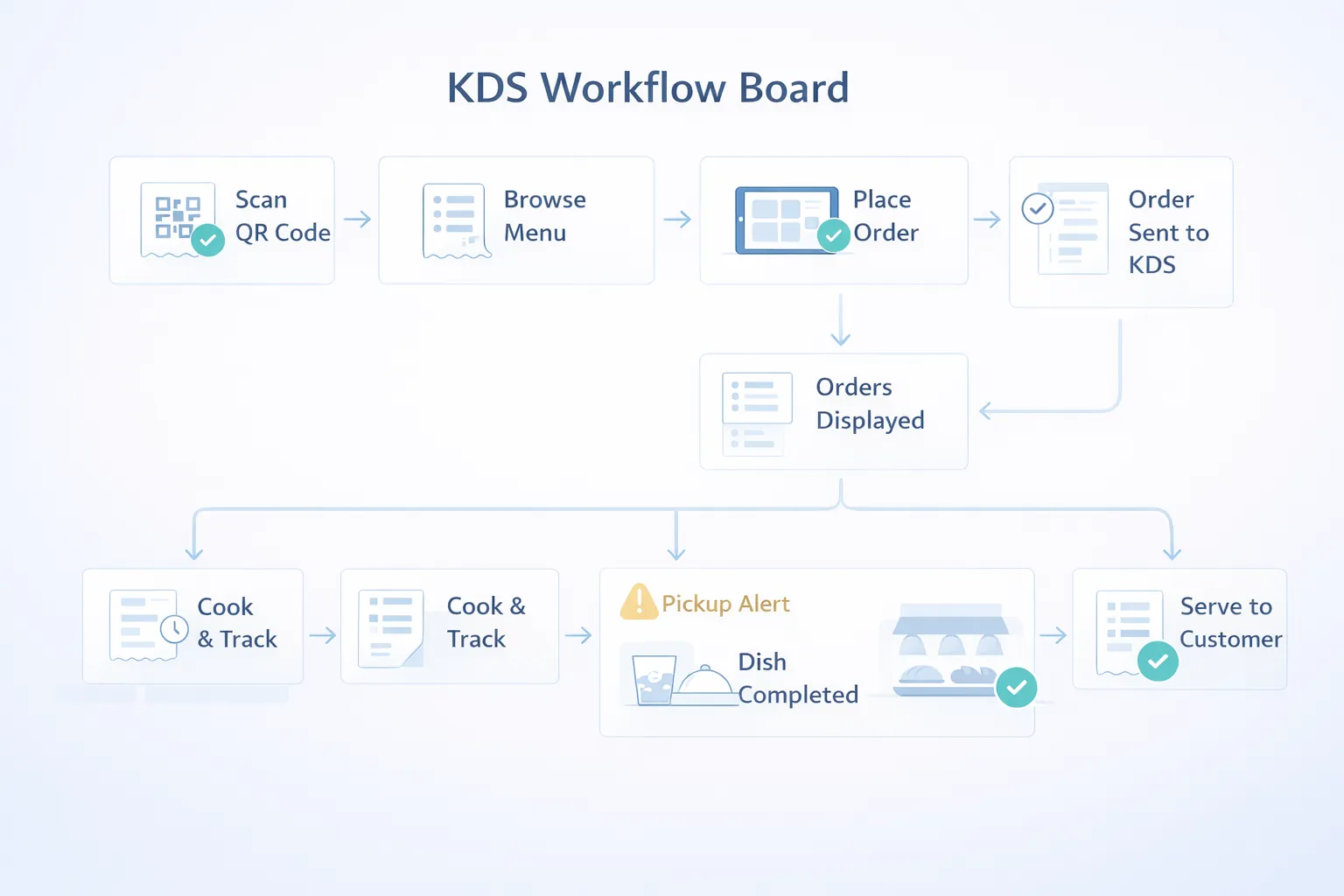
A practical KDS workflow has seven steps:
A table orders paneer tikka, cold coffee, and brownie. The tandoor screen receives the tikka, the beverage screen receives the coffee, and dessert receives the brownie. Each station updates its item independently. Expo sees the complete order as ready only after all three are finished, preventing one prepared item from being sent while the rest remain invisible.
This flow should be documented before UI design. If routing, modifiers, cancellations, and partial readiness are ambiguous on paper, a larger screen will not solve the operational problem.
KDS is especially useful for QSRs, cafes with active takeaway, casual dining restaurants, cloud kitchens, and multi-station kitchens where one order may involve different prep areas. It becomes valuable when paper KOTs start causing missed items, delayed communication, or difficulty tracking what is still pending.
It is also a strong fit for kitchens facing peak-hour stress, staff turnover, or order volume growth. In those situations, screen-based structure often reduces dependence on one experienced person "keeping everything in mind."
The kitchen is where small communication gaps turn into real guest problems. Even a well-designed ordering flow can break down if order handoff into preparation is weak.
A good KDS makes the kitchen queue visible and actionable. It shows not only what to make, but also what is getting late, what is blocked, what is already ready, and what should be grouped together. That clarity helps both speed and consistency.
Before building, decide how deep the kitchen-side workflow should go.
Orders should appear with item details, quantity, table or channel context, modifiers, and timing. This is the baseline screen that replaces or supplements KOT slips.
Some restaurants need one shared queue. Others need automatic separation by station, such as bar, grill, tandoor, dessert, or packaging. This routing logic is often the biggest functional decision in a KDS build.
The team should be able to move items or full orders through statuses such as new, in progress, ready, served, packed, or delayed. This helps both kitchen control and owner reporting.
The service or packing side should know when an order is actually ready, not just when it disappeared from a paper slip.
For restaurants planning guest-side ordering next, QR code menu websites for restaurants connects strongly with KDS planning.
KDS projects go smoother when the kitchen team agrees on the operational model before screens are designed.
This is one of the most important questions. Some kitchens work better with one combined queue and strong grouping. Others need distinct views for beverage, hot line, dessert, or packing. The answer changes the whole workflow.
If one station completes its part but another is still pending, the system needs clear rules about whether the item or full order moves forward. Restaurants often skip this discussion and then feel friction later.
If the KDS requires too many taps or too much thinking, staff will avoid it during peak load. Status flow should be designed around the person who will actually touch the screen under pressure.
Screen placement, visibility angle, heat, touch access, and line of sight matter. A technically good KDS can still underperform if the physical setup is wrong.
Restaurants need a defined response when a screen, local network, internet connection, or upstream ordering channel fails.
Cloud hosting does not remove outlet-level risk. Test the actual router, screen location, power conditions, and peak-hour load. For multi-channel integrations, review the integration and automation service before assuming every provider exposes the same order events.
These are the features that usually matter most in a practical KDS build.
Printer fallback, recipe-level routing, prep-time analytics, delayed-order alerts, or outlet comparison are often added after the basic KDS workflow is stable.
KDS is successful when the kitchen feels less noisy and more readable, not just more digital.
The team should need fewer verbal checks about what to cook, what is late, or which item belongs to which order. That is one of the fastest signs the system is improving flow.
During peak hours, staff should be able to glance at the screen and understand priority without depending on memory or repeated slip checking. If that happens, the KDS is already paying off.
When ready items are surfaced more clearly, the service or packing side responds faster. That reduces waiting and makes the kitchen feel more coordinated with the front of house.
Once timing and status data become reliable, owners can start learning from kitchen bottlenecks instead of only hearing about them after service problems. That longer-term visibility is a major bonus of a good KDS setup.
If your kitchen still runs on paper and memory, KDS is usually one of the highest-impact operational upgrades after ordering itself.
KDS cost depends on how many stations, screens, and status rules the kitchen needs.
₹1.35 lakh to ₹2.4 lakhIncludes live queue, item display, basic status change, and one-screen kitchen flow.
₹2.5 lakh to ₹4.2 lakhIncludes station routing, timers, modifiers, expo view, and stronger admin control.
₹4.4 lakh to ₹6.75 lakhIncludes multi-screen routing, outlet-level settings, analytics, and deeper integration with ordering or POS.
For most independent restaurants and cloud kitchens, the ₹2.5 lakh to ₹4.2 lakh range creates the strongest operational improvement without chasing enterprise complexity.
Price rises with multiple kitchen stations, deep printer logic, outlet-specific workflows, recipe routing, or tight POS and ordering integration from day one.
KDS should be fast, readable from a distance, and reliable under burst traffic.
Next.js or responsive web app for kitchen screens and supervisor views.Node.js for routing logic, status updates, timers, and order aggregation.PostgreSQL for orders, items, station rules, timing records, and histories.KDS projects usually take 3 to 7 weeks depending on routing complexity.
Testing on the real kitchen floor matters a lot. A KDS that looks clean in a demo can still fail if touch flow, spacing, or grouping is wrong during live service.
These are the factors that affect KDS budget most:
The best KDS reduces kitchen confusion, not just paper. If the staff still needs constant verbal clarification, the workflow design needs work.
To keep rollout practical:
This prevents the project from becoming overdesigned and underused.
Run these checks with real menu structures and staff before launch:
Measure median ticket time, oldest open ticket, remakes caused by missed notes, delayed handoffs, and failed integrations. Compare the same service periods before and after rollout rather than claiming success from one quiet demonstration.
Kitchen screens need fast scanning and big actions, not delicate admin UI.
If too many conditions decide where orders go, training and troubleshooting get harder.
The kitchen may finish items, but the service team still needs clarity on readiness.
Kitchen visibility conditions are different from office screens.
KDS must be tested during realistic pressure, not only in a quiet setup.
It is a screen-based kitchen workflow that receives orders, routes items to preparation stations, tracks timing and status, and coordinates the final handoff to service or packing.
For SMB restaurants, custom KDS usually starts around ₹1.35 lakh and often falls in the ₹2.5 lakh to ₹4.2 lakh range.
It can be, especially for busy restaurants where order clarity, timing visibility, and station routing matter.
Not always. A KDS can receive orders from a POS, QR ordering system, waiter app, or another approved source. The integration must still define order IDs, modifiers, cancellations, payment or acceptance state, and retry behaviour.
Yes, if order volume and kitchen coordination justify it. It is not only for large chains.
Usually 3 to 7 weeks depending on routing and integration depth.
Yes, and that is one of its most practical benefits.
Treating kitchen screens like standard admin screens instead of operational interfaces under pressure.
If your kitchen is still dependent on paper and verbal coordination during peak service, a well-scoped KDS can create immediate operational relief.
Related Articles
March 27, 2026
Plan restaurant QR ordering: menu and cart, table context, staff handoff, payment and POS boundaries, cost drivers and a sample-order acceptance checklist.
Read article
March 27, 2026
Compare PDF menus, editable QR menus and restaurant QR ordering. Review cost drivers, menu ownership, outlet rules and a sample-data launch checklist.
Read article
April 16, 2026
Plan restaurant table management software for seating, QR and waiter orders, kitchen status, split bills, payments, table release, reports, roles, and rollout.
Read article
April 18, 2026
Plan restaurant inventory software for purchases, units, recipes, yield, wastage, transfers, counts, food-cost variance, permissions, and integrations.
Read article