
March 27, 2026
Kitchen Display System: How It Works for Restaurants
Learn how a restaurant kitchen display system works, from order routing and station screens to expo handoff, offline planning, pricing and rollout tests.
Read articlePublished Updated
Plan restaurant QR ordering: menu and cart, table context, staff handoff, payment and POS boundaries, cost drivers and a sample-order acceptance checklist.
Many restaurants want digital ordering, but they do not actually need a bloated food-delivery app. What they usually need is a practical restaurant ordering system that handles QR menu browsing, table-wise ordering, order status, kitchen handoff, and owner visibility without creating extra chaos for staff.
In 2026, diners are comfortable scanning a QR code, checking the menu, customizing items, and placing orders from the table. Restaurant teams, on the other hand, need a system that does not slow service. That means the software must be easy for guests, fast for staff, and reliable for the kitchen.
This guide explains how to evaluate the ordering workflow, compare product setup with custom development, and agree payment, integration and rollout responsibilities.
If your restaurant wants QR-based browsing and direct order capture without depending only on waiters to note every item manually, a restaurant ordering system can improve speed, reduce order-entry errors, and give the owner clearer control over service flow.
For most restaurants, the best version of phase one includes:
If you are still deciding whether the system should start as a lighter QR menu site or a broader restaurant software layer, QR code menu websites for restaurants and restaurant admin dashboard features are the right companion reads.
Start with the VASUYASHII restaurant QR ordering walkthrough to review browser menu, cart, order status and owner controls. This guide lists requirements to evaluate; it is not a promise that every payment, kitchen, printer or POS feature is already included.
A menu-only QR page lets guests browse while staff take orders. Ordering adds a submitted basket, order identity and staff handoff. A payment gateway or restaurant POS adds separate account, integration and operating requirements. Record the included setup and unresolved gaps before commissioning custom work.
This system is especially useful for cafes, casual dining restaurants, food courts, lounges, breweries, quick-service restaurants, and multi-floor outlets where menu browsing and order entry can be shifted partially to the customer side. It works best when the restaurant wants to reduce waiter dependency for basic order taking but still keep service human where it matters.
It is also a strong fit for outlets with high peak-hour traffic, limited staff, or frequent menu changes. If the restaurant has order mistakes, delayed billing handoff or table confusion during rush periods, use those scenarios in the trial. Measure the actual staff workflow before assuming the change improves service.
Traditional restaurant ordering depends heavily on the speed and memory of staff. That is manageable when the floor is calm. During busy hours, it turns into repeated problems: missed modifiers, wrong items, table confusion, delayed kitchen entry, and slower service recovery when something goes wrong.
A good restaurant ordering system should reduce the gap between menu discovery, order placement, kitchen action, and owner reporting. The software should not feel like extra work. It should shorten small repetitive steps so the team can focus more on service quality and less on coordination overhead.
Before building, define exactly which part of ordering is being digitized.
Guests scan a QR code, browse categories, open item details, choose variants or add-ons, and submit the order. This needs to feel fast and obvious on mobile because that is where most diners will interact.
The system should know where the order came from. In dine-in settings, this means table mapping. In food-court or pickup cases, it may mean token, bill counter, or zone mapping. This structure matters because it affects KOT routing and owner reporting.
Once an order is placed, the back-of-house side should know what to prepare and how to group items. The floor side should know if an order is accepted, in preparation, ready, served, or held up.
Managers should be able to pause items, adjust categories, watch active orders, and review sales patterns. If the ordering system has no admin clarity, the restaurant quickly loses trust in it.
If your kitchen workflow is the biggest pain point, Kitchen Display System (KDS) Explained is worth reading alongside this guide.
These are the features that usually matter most in a practical restaurant ordering build.
Many restaurants add restaurant admin dashboard features, KDS screens, POS integration, feedback capture, or loyalty logic after phase one proves stable.
If your restaurant is exploring QR ordering, the smartest first step is to decide what should happen on the guest side, what should happen on the kitchen side, and what the owner must be able to control daily.
An available product may need menu configuration and staff training; a custom build may need new ordering rules and integrations. Compare those scopes separately, with recurring and third-party charges shown in the written proposal.
| Cost component | Confirm before approving |
|---|---|
| Restaurant setup | Menu entry, table mapping, staff roles and training included |
| Custom workflows | Item variants, order exceptions, reports or other gaps needing development |
| Payments | Selected provider, merchant onboarding, charges and verification responsibilities |
| POS, kitchen or printer connections | Exact vendor and model, supported interface, testing and failure handling |
| Hosting and support | Recurring fees, support coverage, ownership and data export |
| Additional outlets | Shared versus outlet-specific menus, roles and operational reports |
This article does not set a fixed development price. Request an estimate after the walkthrough establishes what is available, what requires configuration and what is custom work.
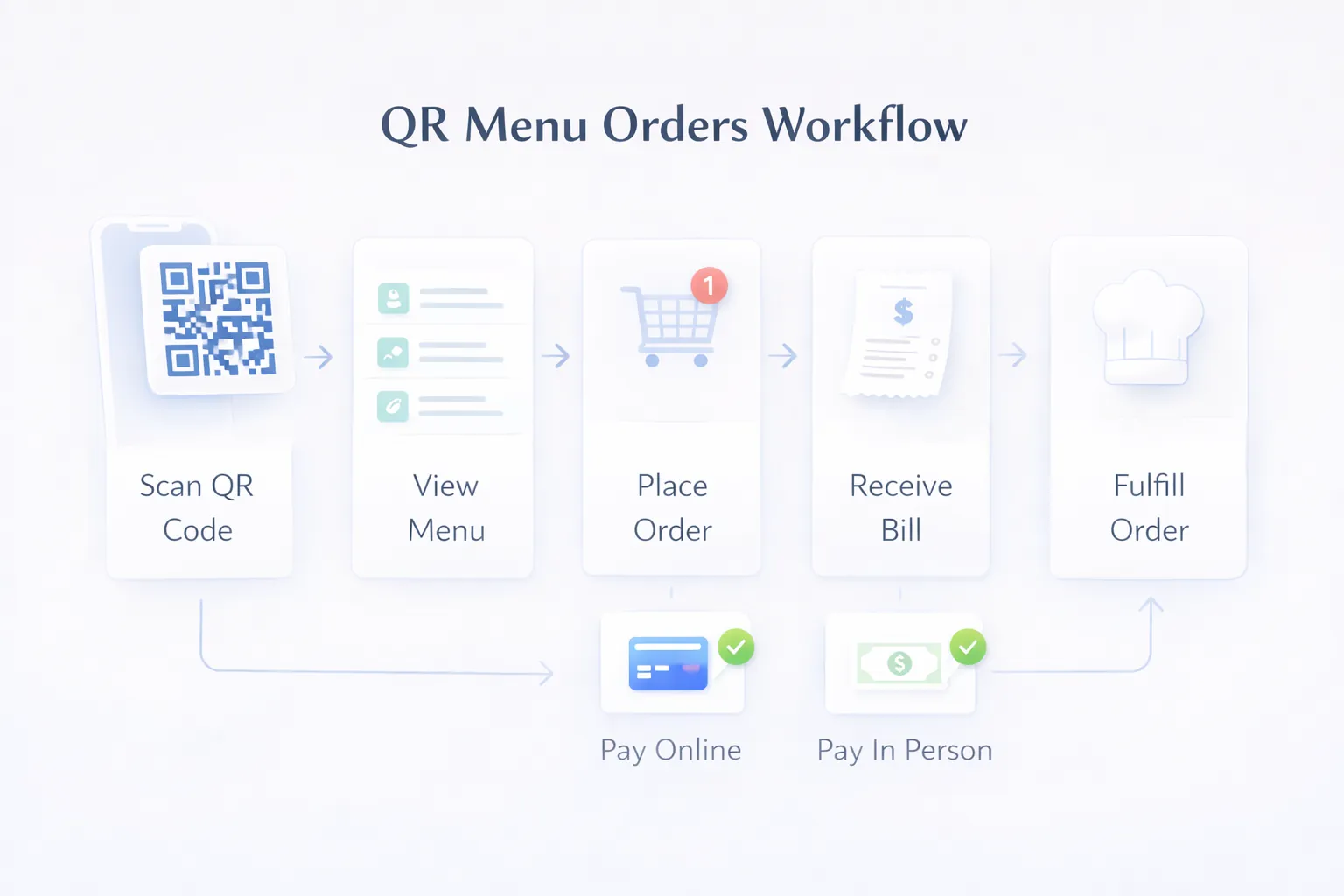
Illustrative workflow only. The payment and bill steps depend on the selected setup; the image is not evidence of an active merchant account, a working integration or a restaurant deployment.
Evaluate reliable order identity, duplicate-submission handling, server-side validation, staff permissions and visible failure states. Agree whether status updates need to be immediate, which devices staff will use and what happens when connectivity is interrupted.
Choose the implementation around the available product, required interfaces and support ownership. A framework name does not establish compatibility with a POS, printer or payment provider. Browser ordering can be evaluated before deciding whether progressive web app features add value.
Confirm a launch date after this scope review. Content readiness, third-party onboarding and integration testing can change the schedule; a demonstration date is separate from restaurant launch readiness.
Use the restaurant QR ordering worksheet to record observations. The checks below are proposed tests, not customer results or completed product validation.
| Scenario | What to observe |
|---|---|
| Sample Table A places one order | The correct table context and one identifiable order reach the staff view |
| Guest retries after a slow response | The agreed duplicate or retry behavior is clear to both guest and staff |
| An item becomes unavailable | The current guest basket follows the agreed availability rule |
| Staff accepts, rejects or cancels | Only permitted actions occur and the guest sees the intended status |
| Connection or provider fails | Staff can explain order status and follow the agreed manual fallback |
| Payment route is selected | Distinguish pay-at-counter, displayed UPI details and a verified gateway transaction |
| A POS or kitchen connection is required | Demonstrate the exact connection or record it as a gap; an order screen alone is insufficient |
Use dummy records in a designated test environment. Do not enter live customer details, send messages or collect real payments as part of a public demo.
These are the biggest factors that change final budget:
The best build should make service calmer. If the staff still needs to repeat too many manual steps after launch, the system is not designed tightly enough.
To keep rollout practical:
This approach gives the restaurant a working operational layer quickly. Once that is stable, expanding into KDS, feedback flow, POS bridge, or cloud-kitchen features becomes much easier.
The guest UI matters, but if the manager panel and kitchen handoff are weak, the system creates more confusion behind the scenes.
A PDF can cover simple menu access, but it cannot establish cart, order or staff-handoff behavior. Test those actions when evaluating an ordering system.
Restaurants need clarity under pressure. Too many statuses can slow teams during peak service.
Even a great ordering flow fails if menu changes are painful. Admin usability matters as much as customer UX.
Rush-hour usage is different from a quiet demo. The system should be tested with live-like service scenarios before rollout.
Before building the order engine, use the restaurant website menu, orders and cost guide to separate local discovery, branch pages, menu ownership, reservations, WhatsApp, pickup, delivery, QR and direct-order requirements.
A written estimate should separate available product setup, custom gaps, integrations, hosting, support and provider charges. Review the restaurant workflow before treating any price as a complete quotation.
Yes, especially when the restaurant wants faster table ordering, fewer order-entry mistakes, and better owner visibility.
Not always. Many restaurants do well with a QR-based responsive web experience first.
It may be possible, depending on the exact system, interface access and agreed development. Confirm compatibility, licensing, order mapping and failure handling before promising a connection.
Cafes, QSRs, casual dining outlets, lounges, and food-court setups usually benefit strongly.
Yes. That is one of the most useful admin features because sold-out items can be controlled instantly.
Building the customer side well but ignoring how the kitchen and floor staff will actually use the system.
Agree the schedule after reviewing menu readiness, current product fit, required integrations, payment onboarding and staff acceptance. A demo does not establish the live rollout date.
If your team is still dependent on manual order taking for everything, there is a very clear opportunity to improve service speed and control without overcomplicating operations.
Related Articles
March 27, 2026
Learn how a restaurant kitchen display system works, from order routing and station screens to expo handoff, offline planning, pricing and rollout tests.
Read article
March 27, 2026
Compare PDF menus, editable QR menus and restaurant QR ordering. Review cost drivers, menu ownership, outlet rules and a sample-data launch checklist.
Read article
May 15, 2026
Plan a restaurant website with mobile menus, local SEO, reservations, QR access, WhatsApp or direct ordering, payments, costs, and launch checks.
Read article
April 16, 2026
Plan restaurant table management software for seating, QR and waiter orders, kitchen status, split bills, payments, table release, reports, roles, and rollout.
Read article