
March 27, 2026
Restaurant Admin Dashboard: Features and Reports
Restaurant admin dashboard features guide with owner-panel reports, pricing in India, tech stack, timeline, and cost drivers for restaurant software today.
Read articlePublished Updated
Estimate admin dashboard cost in India by workflows, roles, reports, integrations, data volume, security, testing, deployment, and ongoing operational support.
Admin dashboard cost depends on what employees must control, not how many cards appear on the first screen. A dashboard that reads five summary metrics from one database is very different from an operations system that creates orders, approves discounts, imports spreadsheets, exports customer data, connects payment APIs, and separates several branches.
A useful estimate begins with workflows, roles, states, data sources, reports, and failure handling. Design style matters, but operational complexity usually drives more cost than colours or chart count.
Shows trusted KPIs, filters, trends, and drill-down. Cost comes from source integration, metric definitions, data freshness, access scope, and performance.
Allows staff to create, edit, approve, assign, cancel, import, export, or reconcile records. State transitions, validation, audit logs, and permissions add substantial work.
Supports several companies or customers on one platform. Tenant isolation, plans, quotas, support access, audit, billing, offboarding, and security testing create a higher risk boundary.
Do not compare quotes until providers are estimating the same category.
| Capability | Smaller scope | Larger scope driver |
|---|---|---|
| Authentication | Email/password, reset | SSO, MFA, session/device policy |
| Roles | Admin and user | Capability + branch + record + state rules |
| Records | One simple entity | Related workflows with version history |
| Reports | Existing query | New definitions across several sources |
| Imports | Clean fixed template | Mapping, dry run, duplicates, rollback |
| Integrations | One stable API | Payments, WhatsApp, webhooks, retries |
| Files | Basic upload | Private storage, scanning, signed access |
| Audit | Login history | Field changes, approvals, exports, support access |
| Deployment | One environment | Staging, production, monitoring, recovery |
The table is more useful than a universal package price because it identifies what the team must design, build, and test.
Admin, Manager, and Staff labels do not define security. Write permissions as action plus data scope plus record state.
Example:
Each additional exception increases design and test effort. Use the permission matrix template before requesting a quote.
A tile called Revenue is not a specification. Define whether it uses invoices, payments, orders, refunds, tax, discounts, cancelled records, timezone, and posting cutoff.
For each metric document:
Reports that combine multiple systems may need an analytics pipeline or snapshots rather than live transactional queries. The report automation guide explains scheduled validation and delivery.
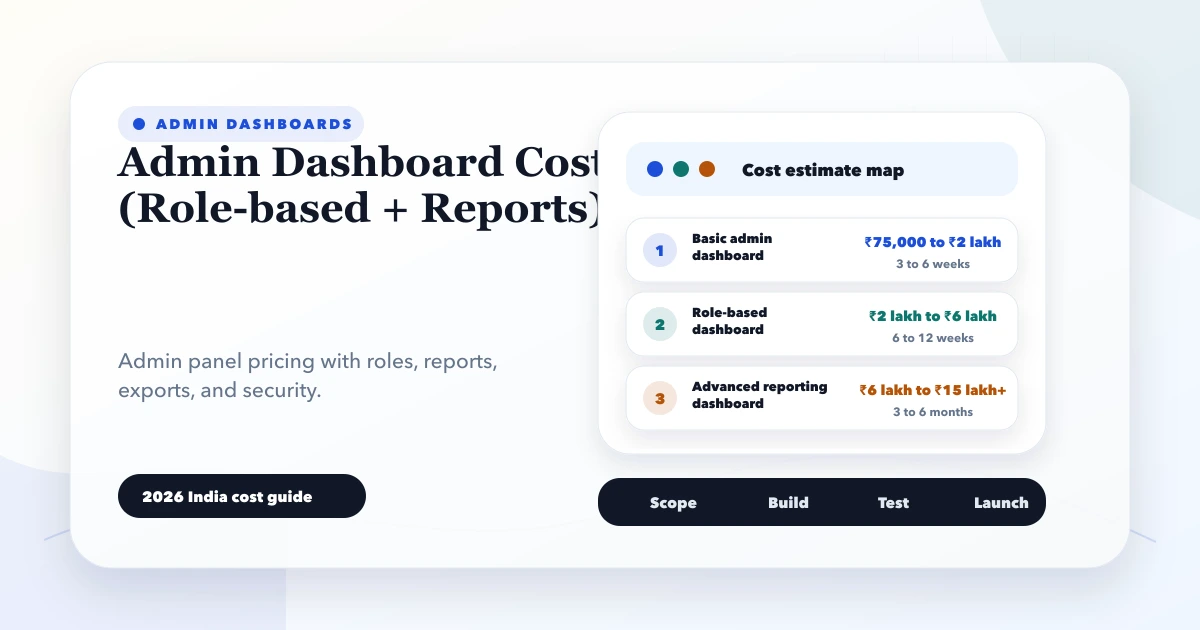
Exact prices need a written scope. A rough planning framework can separate:
The first may fit a modest custom project; the third can be several times larger. Do not rely on a number without assumptions, acceptance tests, taxes, recurring services, and post-launch support.
Ask vendors to price discovery separately when requirements are uncertain. A short paid discovery can be cheaper than receiving three incomparable fixed quotes.
Draft, submitted, approved, rejected, posted, cancelled, and restored states need actions, permissions, history, and edge cases.
Legacy spreadsheets create duplicate, format, relationship, and reconciliation work. Dry runs and correction tooling cost more than a one-click upload.
External APIs add credentials, rate limits, webhooks, retries, provider outages, test environments, and maintenance.
Customer, payment, health, employee, or financial data requires stronger threat modelling, access tests, logging, backups, and incident preparation.
Large tables, exports, search, dashboards, and concurrent users need indexing, caching, pagination, background jobs, and load tests.
Every role, branch, state, browser, and device expands the test matrix. Cheap quotes often omit this effort rather than remove the need.
Map one complete workflow, permission matrix, data source, reports, exceptions, and acceptance criteria. Prototype the operator path.
Build authentication, master data, main transaction, search, validation, roles, audit, and essential reports.
Add imports, notifications, payment or messaging connections, scheduled jobs, and reconciliation.
Run security, performance, restore, monitoring, and user-acceptance checks before adding more modules.
The secure data-entry panel guide shows how one high-volume operator workflow can be scoped first.
A comparable quote should state:
If these are absent, the price may change as soon as implementation starts.
The role-based security guide covers these controls in depth.
Budget for hosting, database, storage, email/SMS/WhatsApp, payment fees, monitoring, backups, domain, licences, support, security updates, and feature changes. Usage-based services should have limits and alerts.
Ownership also costs time: someone must approve users, review failed jobs, reconcile reports, update masters, and decide change requests. Software without an operational owner becomes unreliable even if the code is stable.
admin.VASUYASHII would estimate after mapping one operating workflow, its roles, exceptions, reports, data, and integrations. Our implementation estimate uses four working artefacts before screen count: a status-transition table, permission matrix, report dictionary, and representative acceptance dataset. These expose hidden work that a list of dashboard pages cannot show.
For example, a simple Orders screen becomes a larger workflow when operators can edit drafts, managers approve discounts, accounts lock paid records, support can view but not export customer data, and owners need branch-wise reporting. The estimate must include the backend rules and tests for those boundaries, not only the visible controls.
We also separate the initial build from recurring provider, hosting, monitoring, backup, support, and change costs. This is our estimation approach, not a universal price promise. Review web application services, software development, or contact us with a redacted process sample.
Before the quote is final, one representative record should be walked from creation to closure with every role present. Each transition should name the required fields, validation, permission, notification, audit entry, reversal path, and report effect. This short exercise reveals whether a requested dashboard is mainly a reporting layer or a transaction system with operational responsibility. It also gives the client a concrete basis for comparing proposals that may use the same feature names but include very different backend scope.
There is no defensible single price. Cost depends on whether the dashboard is read-only, operational, or multi-tenant and on workflows, roles, reports, data, integrations, migration, security, and support.
Only if real users genuinely need identical access. Even small systems often need owner, operator, reviewer, and restricted support boundaries.
Simple reports from clean existing data may be small. New definitions across inconsistent sources can require data engineering, snapshots, reconciliation, and performance work.
Not automatically. A responsive web panel may be enough. Native or offline mobile workflows need separate interaction, security, sync, testing, and distribution scope.
Define bug support, monitoring, backups, dependency/security updates, provider changes, response times, small changes, exclusions, and renewal cost.
Provide one workflow map, role matrix, sample data, report definitions, integration list, expected volume, exclusions, and acceptance examples.
Write the main record lifecycle and identify every user who can move it between states. That reveals the real dashboard scope. Contact VASUYASHII for a focused estimate.
Related Articles
March 27, 2026
Restaurant admin dashboard features guide with owner-panel reports, pricing in India, tech stack, timeline, and cost drivers for restaurant software today.
Read article
May 30, 2026
Plan a Noida business web app with role-based workflows, dashboards, approvals, integrations, audit controls, phased delivery, and ownership.
Read article
May 24, 2026
Plan warehouse inventory software for receiving, put-away, bins, picking, dispatch, returns, transfers, counts, adjustments, barcodes, and stock reports.
Read article
May 23, 2026
Plan a custom reports dashboard with metric definitions, source mapping, sales and stock views, role access, refresh rules, reconciliation, and alerts.
Read article