
May 22, 2026
Customer Support Ticketing System Development (2026)
Plan a customer support ticketing system with channels, SLA rules, assignment, escalation, reports, costs, rollout steps, and Indian SME examples.
Read articlePublished Updated
Set up SaaS customer support with account identity, ticket states, priority rules, SLAs, routing, secure access, bug escalation, knowledge base, and reporting.
A SaaS support system must connect customer messages to the correct account, subscription, user, product area, incident, and owner. It should help the team resolve issues safely and learn from recurring friction. A shared inbox alone cannot provide reliable priorities, permission boundaries, escalation, or product feedback once customer volume grows.
The setup begins with a support operating model, not a tool purchase. Define who can ask for help, which channels are supported, what information agents may access, how severity is decided, and when a ticket becomes a product incident or customer-success risk.
A practical SaaS support setup needs:
The first goal is not to automate every reply. It is to prevent lost requests, unsafe access, and unclear responsibility.
Write what support includes and excludes. Categories may include:
Do not promise 24/7 support unless staffing, monitoring, escalation, and contractual coverage exist. Explain channel and response expectations by plan where applicable.
A support request may come from a user, but commercial and data scope usually belongs to an account or tenant. Store:
Never rely only on an email domain to grant access to tenant data. People change companies, use shared addresses, or manage several workspaces.
Use states that describe responsibility and next action:
| State | Meaning | Required owner/action |
|---|---|---|
| New | Request received but not triaged | Queue owner reviews |
| Open | Scope understood and assigned | Agent investigates/responds |
| Waiting on customer | Specific information requested | Customer action and reminder rule |
| Waiting internally | Product, billing, or operations input needed | Internal owner and due time |
| Monitoring | Fix/workaround delivered, outcome observed | Agent confirms stability |
| Resolved | Requested outcome or documented answer delivered | Resolution code recorded |
| Closed | Retention period or confirmation complete | Reopen policy applies |
Avoid using Pending for every delay. The dashboard should show who is expected to act.
Priority combines customer impact, urgency, scope, security, and workaround. A loud message is not automatically critical.
Example model:
Agents need examples and authority to escalate. Security reports should follow a separate restricted process rather than appear in a broad support queue.
First response confirms ownership and next step; it is not the same as resolution. Track both under defined business hours, plan, and priority rules.
An SLA contract should define:
Do not pause the clock merely because a ticket moved to another internal team.
Customers may contact email, in-app help, form, chat, phone, or WhatsApp. Consolidate them into one case history without losing the original channel.
Channel rules should cover:
Do not ask customers to repeat the same timeline after every handoff.
Collect only information needed for diagnosis and routing:
Avoid requesting passwords, full payment credentials, authentication tokens, or unnecessary personal data.
Route by product area, customer plan, language, priority, and skill where useful. Every queue needs a named owner and fallback. Round-robin assignment without expertise can increase handoffs.
Escalation should preserve:
The support agent should remain responsible for customer communication even when engineering investigates.
Support tools often expose sensitive customer context. Apply least privilege:
The SaaS security checklist provides broader multi-tenant controls.
A support ticket describes a customer case; a defect represents a product problem; an incident coordinates service impact. Link them without merging their lifecycles.
When several tickets relate to one incident:
Do not close customer cases simply because engineering marked a code issue done. Confirm deployment and customer outcome.
Create an article when a question is recurring, stable, and safe for the intended audience. Each article needs owner, product/version scope, last review, prerequisites, steps, expected result, and support fallback.
Separate public help from private account procedures and internal runbooks. Search analytics, failed searches, and ticket deflection can guide updates, but do not optimise only for fewer tickets. A confusing article may suppress contact while leaving users blocked.
Support reacts to questions and issues. Customer success helps an account reach intended value and manage adoption/renewal risk. They share context but should not collapse into one undifferentiated queue.
Useful handoffs include:
The SaaS churn guide explains how support evidence can inform retention without inventing a magic health score.
Automation can acknowledge receipt, classify low-risk requests, suggest articles, detect duplicates, request missing fields, route tickets, and remind owners. Human review remains important for security, billing disputes, data access, account changes, angry customers, and unclear impact.
An AI assistant should not fabricate product capability or expose one tenant's information to another. Ground answers in approved sources, log citations/version, provide escalation, and test prompt/data isolation.
Track metrics that lead to decisions:
Do not reward agents for closing tickets quickly if reopen and customer effort increase.
Our implementation workshop takes a redacted sample of recent requests and maps each one from intake to verified identity, priority, owner, internal escalation, customer update, and resolution evidence. We use these cases as acceptance tests for routing and permissions before adding automation.
This process can improve operational clarity; it does not guarantee lower churn or support cost. Product quality, staffing, customer fit, and reliable engineering remain essential.
Not always at launch. A controlled shared workflow may be enough for low volume, but identity, ownership, security, and history must still be reliable. Adopt a tool before messages become untraceable.
Support resolves questions and issues. Customer success helps accounts achieve value and manage adoption. They should share approved context with clear ownership.
It can be a channel when consent, identity verification, provider rules, retention, routing, and support hours are defined. Move sensitive work into an authenticated flow.
Start with response by priority, owner assignment, internal/customer wait, resolution, reopen, backlog age, repeated causes, and customer effort under a clear method.
It can assist with approved low-risk knowledge and routing. Use grounded sources, tenant isolation, confidence thresholds, logging, and human escalation for sensitive or uncertain cases.
Record the customer problem, account context, frequency, workaround, and impact. Do not promise delivery dates before product review and approval.
Take 30 recent support conversations and label identity, category, priority, owner, waits, resolution, and repeat cause. Use that evidence to design the first queue. Contact VASUYASHII for a focused SaaS support workflow or web application scope.
Related Articles
May 22, 2026
Plan a customer support ticketing system with channels, SLA rules, assignment, escalation, reports, costs, rollout steps, and Indian SME examples.
Read article
May 16, 2026
Reduce SaaS churn by defining cohorts, separating voluntary and involuntary loss, diagnosing causes, improving activation, renewal, support, and measurement.
Read article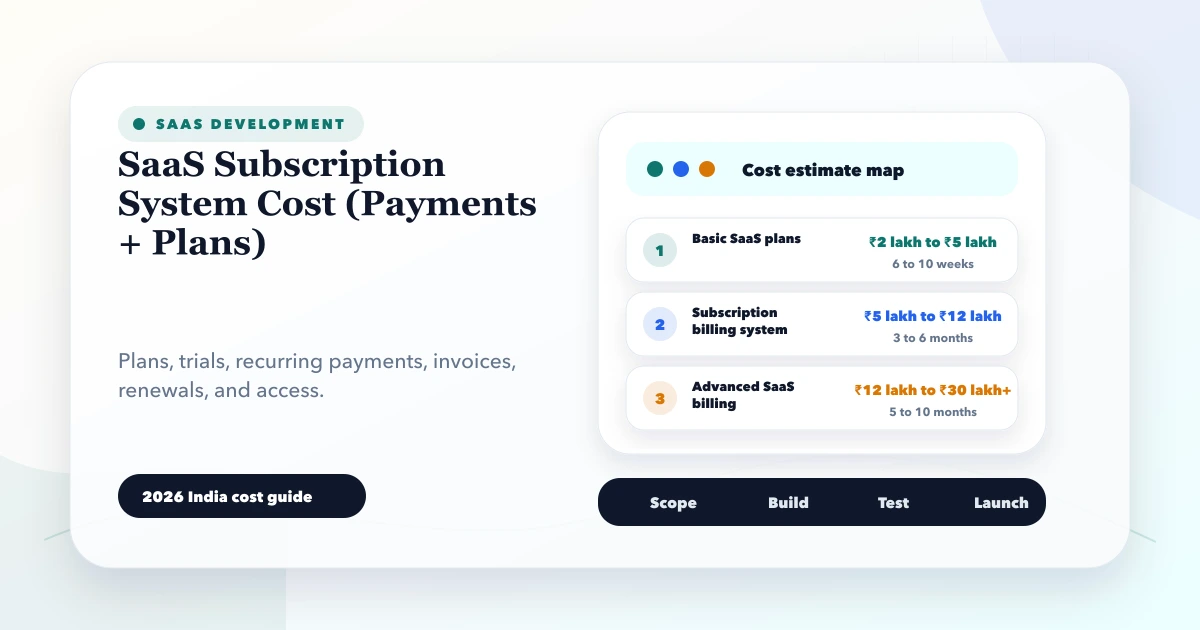
May 28, 2026
SaaS subscription system cost: 2026 India pricing guide with modules, timeline, cost drivers, mistakes, quote checklist, and practical planning ranges.
Read article
May 16, 2026
Compare SaaS maintenance plan pricing, support scope, severity levels, monitoring, security, backups, SLAs, exclusions, and vendor handover in India.
Read article