
April 5, 2026
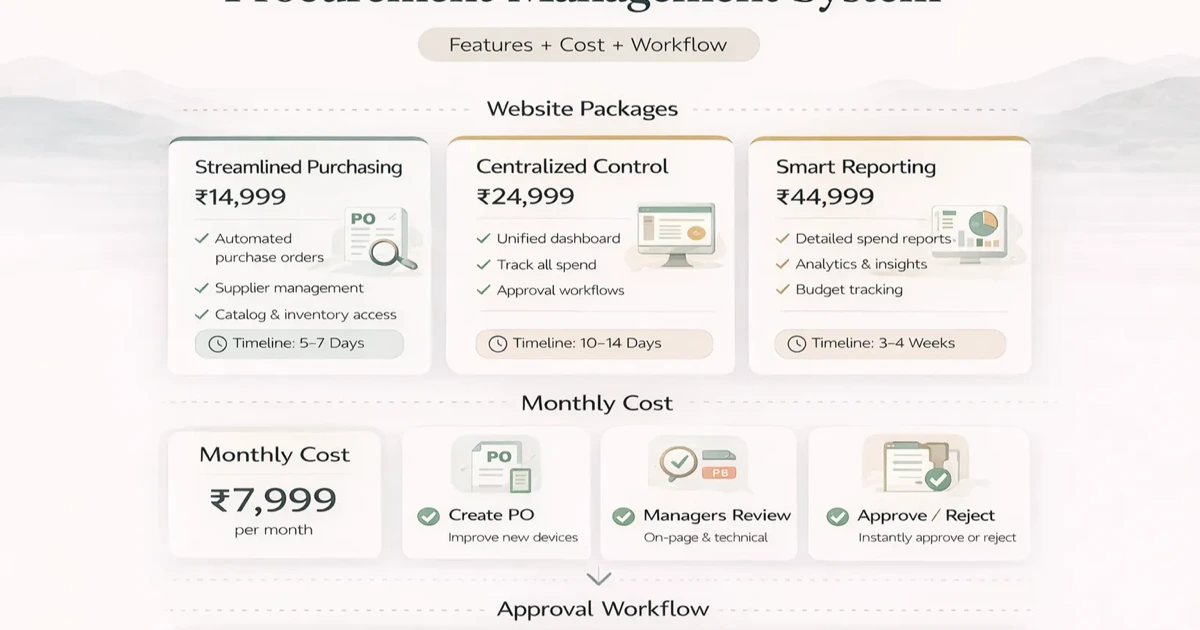
Procurement Management System: Cost and Workflow
Plan a procurement management system with requests, approvals, RFQs, purchase orders, receipt controls, cost ranges, and SME rollout steps.
Read articlePublished Updated
Plan vendor software across supplier masters, purchase orders, receipts, bills, returns, payments, outstanding dues, approvals and reports.
Vendor management software should connect the promise to buy, the goods or service received, the supplier bill, the return or difference, and the payment. A vendor contact list with a manually typed balance cannot explain how the business arrived at that balance.
For traders, wholesalers, retailers, distributors, suppliers, and small manufacturers, the core value is operational control: who was selected, what was ordered, what arrived, what was billed, what was returned, what is due, and which exception needs action.
Vendor management can mean very different products:
An SME may need only a subset. Write the first operational outcome before selecting software, such as "Every supplier due must trace to an accepted purchase and recorded payment."
A clean vendor master can include:
Changes to bank details should be tightly controlled and independently verified through an approved process. Do not treat an email or message alone as sufficient evidence for a payment-destination change.
Small businesses can simplify this, but onboarding should still separate incomplete vendors from approved purchasing choices.
When pricing or supplier selection matters, record:
The lowest item price may not be the lowest landed or risk-adjusted cost. The comparison should show the factors used rather than automatically selecting one value.
A purchase order can move through draft, submitted, approved, sent, partially received, fully received, closed, or cancelled.
Define:
Editing an approved order after receipt can break the audit trail. Use controlled amendments or version history for material changes.
The purchase-sales ERP core guide explains how purchase documents connect with stock and sales.
Receiving proves what physically arrived. Capture:
Decide when stock becomes available. Goods received into quarantine should not appear as sellable stock before acceptance.
For services, replace physical receipt with a service-completion or milestone-acceptance record approved by the responsible owner.
The supplier bill records the financial claim. A useful control compares:
Differences can include quantity, rate, tax, freight, discount, unit, duplicate invoice number, or unmatched item. The system should route exceptions instead of forcing staff to change source records merely to make totals match.
Not every SME needs formal three-way matching, but every payable should have a clear source and approver.
A purchase return should reference received goods and record:
Do not reduce the vendor due merely because goods were physically sent back if the financial adjustment has not been accepted or recorded. Use clear operational and financial states.
An operational vendor subledger can show debits and credits from accepted business documents:
| Entry | Typical balance effect |
|---|---|
| Opening payable | Increases amount due |
| Posted purchase bill | Increases amount due |
| Approved return/credit | Decreases amount due |
| Payment allocated | Decreases amount due |
| Reversal or correction | Depends on source |
The balance should be calculated from entries, not overwritten manually. Each entry must link to its purchase, return, payment, or opening source.
This operational ledger is not automatically a complete accounting ledger. Full accounting may require chart of accounts, journals, statutory treatment, reconciliation, financial statements, and controls outside the vendor module. State product scope honestly.
A payment record can include vendor, company, date, amount, method, bank/cash account reference, transaction ID, proof, notes, and creator.
Allocation answers which bills or opening balances the payment settles. Support partial payment, one payment across several bills, advance payment, and unallocated balance if the business needs them.
Control payment approval and bank-detail access separately. Recording a payment in the operational system does not prove that a bank transaction succeeded unless bank confirmation or reconciliation is included.
Useful views include:
Define the ageing basis. A report based on invoice date will differ from one based on contractual due date.
Example separation:
For a small team, use approval thresholds and audit visibility when complete segregation is not possible. The role-based access guide helps turn duties into permissions.
The business buys from twenty regular suppliers, receives partial deliveries at a warehouse, sends some damaged items back, and pays several invoices in one bank transfer.
The first useful release needs approved vendor masters, purchase orders, partial receipts, supplier bills, mismatch flags, purchase returns, payment allocation, bill-wise outstanding, and ageing. A supplier portal, automated RFQ, bank reconciliation, and vendor score can wait until core records are consistently posted.
This release provides better control than a large dashboard built over incomplete receipts and unallocated payments.
Sample vendor files, purchase orders, delivery documents, bills, returns, payment proofs, and outstanding spreadsheets. Identify duplicate vendor identities and missing references.
Map requester, buyer, approver, receiver, accounts user, and owner. Define posting moments and exceptions.
Standardise legal names, GSTIN, contacts, terms, bank-detail ownership, and active status. Keep an import reconciliation report.
Pilot purchase orders and goods receipt with a small supplier group or category. Validate partial and damaged deliveries.
Connect accepted documents, payment allocation, outstanding, and ageing. Reconcile to approved opening balances.
Add RFQ, approval thresholds, stock connection, document sharing, accounting export, reminders, or portal access according to evidence.
The broader purchase-sales management guide covers both sides of the operating cycle.
Buy a standard product when vendor, purchase, stock, bill, payment, and reporting flows fit its model. Configure before customising.
Custom development can be justified by business-specific approvals, multiple companies, unique receiving/quality rules, deep integrations, special documents, or supplier collaboration. A hybrid can connect a purchasing portal to an existing accounting or inventory system.
Review VASUYASHII Business Suite for practical ERP-lite scope around vendors, products, purchases, payments, expenses, reports, and multi-company operations. It should not be assumed to replace full accounting unless that capability is explicitly stated.
VASUYASHII can scope the workflow through custom software development, connect it with existing inventory, billing, payment, or accounting tools through integration services, or assess current Business Suite fit.
Share your company count, vendor count, purchase documents, receiving method, returns, payment allocation, reports, user roles, and current software through contact.
Purchase management covers requirements, orders, receipts, bills, and returns. Vendor management can also include onboarding, documents, contracts, category approval, performance, communication, and risk.
It is a traceable operational statement of purchase bills, accepted credits or returns, payments, and opening entries. It is not necessarily a full accounting ledger.
Usually no. An order is a commitment. Stock generally increases when goods are received and accepted according to the business rule.
Record one payment and allocate the applicable amount to one or more bills. Preserve any unallocated advance according to the approved model.
A supplier portal can expose selected orders, acknowledgements, dispatch details, documents, or statements. It requires separate identity, restricted scope, and careful document access.
Start with bill-wise outstanding and exceptions: overdue bills, unmatched receipts/bills, returns awaiting credit, unallocated payments, and overdue orders. These lead to action.
Related Articles
April 5, 2026
Plan a procurement management system with requests, approvals, RFQs, purchase orders, receipt controls, cost ranges, and SME rollout steps.
Read article
March 26, 2026
Vendor and client management software guide with CRM-lite features, pricing in India, tech stack, timeline, and rollout advice for growing SMB teams today.
Read article
May 26, 2026
Plan repair center software for job cards, device intake, estimates, parts, technician queues, approvals, warranties, payments, and customer updates.
Read article
May 24, 2026
Plan client management software for credit limits, payment history, follow-ups, statements, permissions, and collection control in Indian SMEs.
Read article