
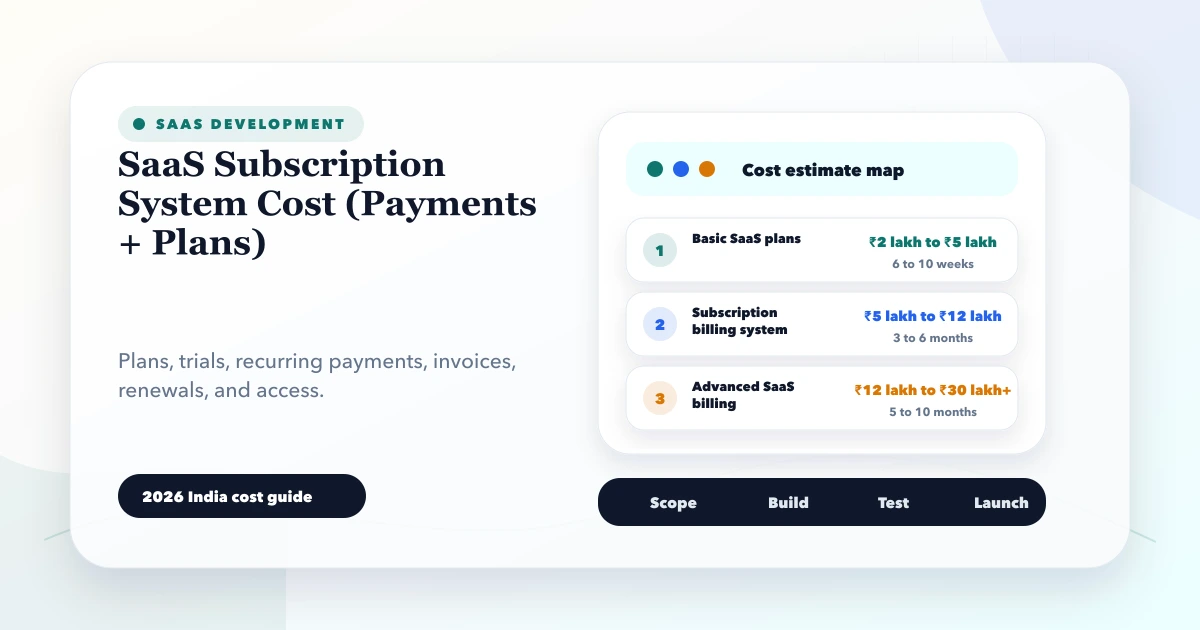
May 28, 2026
SaaS Subscription System Cost (Payments + Plans)
SaaS subscription system cost: 2026 India pricing guide with modules, timeline, cost drivers, mistakes, quote checklist, and practical planning ranges.
Read articlePublished Updated
Plan gym membership software for plans, freezes, attendance, payments, trainer access, renewals, branch reporting, and secure member operations.
Gym membership management software should answer a front-desk question immediately: can this member enter today, under which plan, at which branch, and what action is pending? It should also help owners understand active members, upcoming renewals, attendance, collections, freezes, and trainer workload without combining unrelated spreadsheets.
The difficult part is not storing a member name. It is modelling plan validity and exceptions accurately. A three-month plan may begin on purchase date or first visit. A freeze may extend expiry or consume fixed days. A multi-branch plan may permit all locations or selected ones. These rules need explicit states and history.
A member profile identifies the person. A membership records access entitlement. A payment records money. Keeping them separate prevents common errors.
| Record | Important fields | Example |
|---|---|---|
| Member | ID, contact, emergency contact, branch | One person may buy several plans over time |
| Plan | duration, sessions, branch access, services | Monthly gym-only versus annual multi-branch |
| Membership | start, expiry, status, remaining sessions | The current entitlement |
| Payment | amount, method, date, reference, allocation | Part payment against one membership |
| Freeze | request, approved dates, reason, impact | Extends expiry under approved rule |
| Check-in | member, branch, time, method, result | Allowed or denied with reason |
| Renewal action | due date, owner, outcome | Follow-up before and after expiry |
Do not mark a membership paid simply because one receipt exists. Track plan price, discount approval, amount received, balance, refund, and allocation.
For every plan, decide:
Store a plan version on the membership. If the annual-plan price or benefits change later, existing memberships should retain the terms sold unless the business explicitly migrates them.
The check-in screen should search by member ID, phone, QR, barcode, or authorised device method. It should show a clear result:
An override needs a permitted role, reason, and audit event. The front desk should not edit plan dates just to allow entry. If internet access is unreliable, define what limited offline behaviour is safe and how check-ins will reconcile later.
A renewal sequence can start 15 or 30 days before expiry, but messages should reflect the member's actual plan and status. The system should stop reminders after renewal, opt-out, explicit decline, or an active conversation under the approved policy.
Useful outcomes include renewed, interested later, plan change requested, no response, not continuing, payment pending, and contact correction needed. Each outcome creates a next action or closes the sequence. The automated follow-up reminder guide explains trigger and stop design.
Renewal reports should distinguish:
Attendance is useful for access control, capacity planning, and engagement, but it should not become surveillance without purpose. Define who sees raw check-ins and how long they are retained.
Trainer views may include assigned members, scheduled sessions, attendance, and approved programme notes. Avoid exposing payment history, personal documents, or other trainers' members unless necessary. Health or medical data needs specialist privacy and professional review; do not add it casually to a membership MVP.
| Role | Typical access | Boundary |
|---|---|---|
| Front desk | Search, check-in, basic member action | No discount or refund approval |
| Sales counsellor | Leads, plan sale, renewal tasks | No historical payment deletion |
| Trainer | Assigned members and sessions | No financial exports |
| Branch manager | Branch memberships, overrides, reports | No other branch by default |
| Owner/admin | Plan policy and combined reporting | High-risk changes audited |
Company and branch filters must be enforced by APIs. A member may have cross-branch access, but an employee does not automatically need cross-branch financial visibility.
The system can record membership receipts and dues, but it should not imply a complete accounting ledger unless that module exists. Define invoice/receipt numbering, taxes where applicable, payment methods, part payments, allocations, cancellations, and refund approvals.
Online payment requires server-side verification, webhook handling, idempotency, and reconciliation. A browser success page is not sufficient proof of payment. Use the payment webhook guide when scoping the integration.
Each report should open the underlying records and state its cutoff time. Avoid presenting unpaid membership value as realised revenue.
Create clean member IDs, versioned plans, membership status, search, check-in, and basic role scope. Import active members only after reconciliation.
Add receipts, allocations, dues, expiry queues, outcomes, approved communication, and daily reports.
Add cross-branch entitlements, branch reports, assigned trainers, classes or sessions where genuinely needed.
Connect payment, access hardware, WhatsApp/email, website lead forms, or accounting exports after the core membership state is stable. The integrations service fits this phase.
For a custom operator portal or member experience, see web application development.
Import members, active memberships, plan versions, balances, and selected history from agreed sources. Normalise phone formats, preserve old membership IDs, and resolve duplicate profiles. Reconcile active count, expiry distribution, outstanding amount, and branch totals before launch.
Do not import every attendance row if it has no operational or retention need. Keep older records in a controlled archive if appropriate.
Cost grows with branches, plan complexity, payment and refund rules, attendance hardware, classes, trainer scheduling, member portal, messaging, online payment, historical migration, reporting, and support. A single-branch membership and renewal tool is smaller than a nationwide franchise platform.
Request separate estimates for discovery, core membership, front desk, payments, reports, migration, integrations, QA, deployment, training, and maintenance. Include recurring messaging, payment-provider, hosting, monitoring, and hardware costs.
VASUYASHII would model a plan sale, part payment, check-in, freeze, expiry, and renewal as one test journey before estimating advanced modules. This is our scoping approach, not a claim about a specific gym result. Review custom software services or contact us with redacted plan rules.
Yes, if the business allows it. Define whether access combines, overlaps, or prioritises one entitlement. Do not overwrite the earlier membership.
Use an approved rule: extend by frozen days, pause session validity, or preserve expiry without extension. Record the request, approval, dates, and calculated impact.
Technically possible, but hardware reliability, identity matching, privacy, retention, consent, fallback, and vendor support need separate evaluation. QR or member-ID check-in may be sufficient initially.
Usually yes. A new membership preserves the sold plan version, payment, dates, and renewal relationship. Editing the old expiry hides commercial history.
Yes, as a later module with class capacity, trainer, location, entitlement, cancellation, and waitlist rules. Do not force it into the first release if the gym only needs access and renewal control.
Today's check-ins, upcoming expiries, overdue renewal actions, current dues, and membership exceptions. Every number should open a workable queue.
Write one real plan's start, expiry, freeze, branch, payment, and renewal rules, then test them against five member scenarios. Contact VASUYASHII to turn those rules into a practical implementation scope.
Related Articles
May 28, 2026
SaaS subscription system cost: 2026 India pricing guide with modules, timeline, cost drivers, mistakes, quote checklist, and practical planning ranges.
Read article
May 24, 2026
Plan GST billing software with invoice rules, tax masters, numbering, payments, returns, PDFs, permissions, backups, and integration boundaries.
Read article
May 18, 2026
Diagnose ecommerce checkout drop-off across cart, shipping, login, forms, trust, payment, mobile UX, failures, recovery, analytics, and experiment design.
Read article
May 26, 2026
Plan repair center software for job cards, device intake, estimates, parts, technician queues, approvals, warranties, payments, and customer updates.
Read article