
May 23, 2026
Admin Dashboard Development: Features, Cost, Checklist
Plan admin dashboard development with a feature checklist, indicative India pricing, timeline, roles, reports, audit logs, integrations, and launch controls.
Read articlePublished Updated
Estimate small-business ERP development cost using modules, roles, workflows, migration, integrations, reports, support, and phased delivery decisions.
ERP development cost depends on the business records and controls being implemented, not the number of menu items in a demo. A small billing and inventory workflow is very different from a multi-branch system with purchases, approvals, returns, customer dues, vendor balances, reports, imports, integrations, mobile access, and audit history.
For many Indian small businesses, the practical target is an ERP-lite system: focused billing, stock, purchase, payment, expense, and reporting workflows without claiming to replace full accounting, payroll, manufacturing, or statutory platforms.
This guide shows how to estimate a defensible scope and compare product configuration, integration, and custom development.
Custom development is not automatically the best route. Compare three options:
| Option | Best fit | Main cost risk |
|---|---|---|
| Ready product | Common workflow and willingness to adapt | Subscription growth, add-ons, migration, product constraints |
| Configured/integrated product | Standard core plus a few specific connections | Connector limits, duplicated data, vendor dependencies |
| Custom ERP-lite | Distinct operations and approved ownership | Build, maintenance, support, security, and scope expansion |
If a maintained product solves 80-90% of the process safely, configuration may be better than rebuilding standard functions. Custom work becomes easier to justify when manual workarounds create measurable errors, delays, control gaps, or duplicate records.
Review the ERP roadmap for small businesses before requesting development estimates.
A module name is too broad for quotation. “Inventory” could mean one stock field or a complete movement ledger with locations, reservations, valuation, returns, adjustments, and barcode scanning.
Define each module by records and actions.
Each additional state and relationship adds design, validation, test, and support effort.
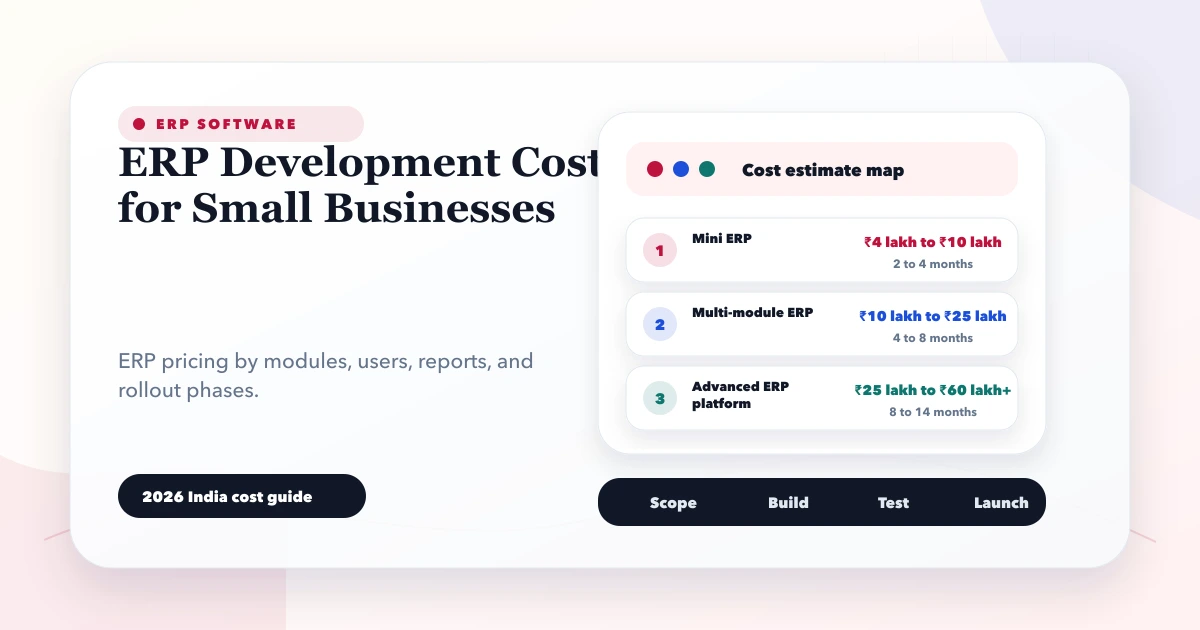
The following are planning bands for a custom Indian SME web application, not fixed market prices or VASUYASHII quotations. Actual cost depends on the acceptance-ready scope, provider, technology, quality controls, integrations, and support.
| Scope | Illustrative planning band | Typical boundary |
|---|---|---|
| Focused operational MVP | ₹3 lakh-₹7 lakh | Masters plus one complete transaction flow and basic reports |
| Multi-module ERP-lite | ₹7 lakh-₹18 lakh | Sales, purchase, stock, payments, roles, reports, PDFs, migration |
| Advanced multi-branch platform | ₹18 lakh+ | Complex approvals, integrations, mobile/offline, high scale, advanced controls |
Do not use these bands as a quote. A narrow system with difficult legacy migration may cost more than a wider clean-data application. Conversely, a proven product subscription may be far less expensive.
Owner, administrator, billing operator, purchase user, warehouse user, accountant, salesperson, and auditor may need different actions and data scope. Backend authorization, company isolation, approval limits, and audit logging require more work than hiding menu items.
Draft, submitted, approved, partially fulfilled, invoiced, paid, cancelled, returned, and reversed records behave differently. State transitions must protect stock, balances, numbering, and reports.
Every master, transaction, report, number series, template, permission, and import needs a company boundary. Branch transfers and consolidated reports add another layer.
Migration cost depends on source quality, duplicates, missing identifiers, opening balances, historical depth, attachment volume, mapping rules, and reconciliation.
Payment gateways, WhatsApp, ecommerce, accounting exports, barcode devices, email, shipping, and existing APIs need error handling, retries, idempotency, logs, and ownership. A connection is not complete when the happy-path API call works once.
Reports require agreed definitions, filters, date logic, exclusions, drill-down, exports, performance, and acceptance totals. “Sales report” is not a complete specification.
Invoices, quotations, purchase orders, receipts, and statements need layout, data rules, numbering, tax display, file storage, regeneration policy, sharing, and access control.
Responsive web access is different from a native mobile app or offline-capable field workflow. Synchronisation, conflict resolution, device security, app distribution, and updates can materially increase cost.
Security, backups, recovery, performance, monitoring, accessibility, audit history, data retention, and support are part of production scope even when they are not visible in screenshots.
| Feature | Focused MVP | ERP-lite phase | Advanced phase |
|---|---|---|---|
| Companies | One | Multiple | Multiple with branches |
| Users | Owner and operator | Role-based teams | Granular roles and approvals |
| Inventory | Basic movement | Purchase, sales, returns | Locations, transfers, reservations |
| Documents | One invoice template | Multiple business PDFs | Versioned templates and secure share |
| Reports | Essential totals | Operational dashboards | Consolidation and advanced analysis |
| Migration | Masters | Masters and opening records | Validated history and attachments |
| Integrations | None or one | Selected operational APIs | Multiple critical integrations |
| Mobile | Responsive web | Responsive/PWA options | Native/offline where justified |
An ERP-lite build usually needs discovery, design, implementation, acceptance testing, migration, training, deployment, and stabilisation. Parallel work does not eliminate dependencies.
Illustrative sequence:
Be cautious of fixed timelines offered before source data, integrations, and exception cases are inspected.
Prepare migration as a separate workstream:
A migration is complete when business owners reconcile agreed totals, not when a script reports success.
For every integration, document:
The API integration services guide explains why ongoing monitoring belongs in the estimate.
After launch, budget for:
Clarify whether support is incident-only, includes a monthly hour bank, or covers agreed service levels. New modules are usually separate development.
VASUYASHII Business Suite is positioned as GST billing, inventory, purchase, payment, expense, and business management software for Indian SMEs. It is ERP-lite, not a claim of full enterprise accounting, payroll, manufacturing, or statutory integration.
A business should first evaluate whether the existing product scope fits. Custom development is relevant when approved workflows, data, integrations, or role boundaries genuinely differ.
Ask every provider to state:
Use the accurate software quote checklist before comparing totals.
In our implementation work, VASUYASHII prices ERP-lite projects after defining one complete transaction lifecycle and the records it changes. We use example invoices, purchases, returns, stock movements, and payments to create acceptance cases. This exposes hidden decisions earlier than a feature-name list.
Our custom software and ERP service separates current scope, later options, third-party fees, migration assumptions, and support. We do not describe an ERP-lite module as full accounting or a complete replacement for specialist statutory systems.
There is no standard figure. A focused operational MVP may be planned in a few lakh rupees, while multi-module and multi-branch systems can require substantially more. Obtain quotes against a written scope.
Usually not at the start. Custom development may be justified by unique workflows or long-term control, but the business owns implementation, maintenance, security, support, and product evolution.
Choose the transaction flow with the clearest operational pain and measurable completion, often sales-to-payment or purchase-to-stock. Include necessary masters, permissions, reports, and exceptions.
Potentially, but accounting needs specialised design, controls, and professional review. Do not assume transaction records automatically produce compliant ledgers or statements.
It depends on scope, data quality, decisions, integrations, acceptance availability, and rollout method. A phased plan is more reliable than a fixed promise made before discovery.
The contract should define business ownership, provider access, export format, backups, retention, termination support, and account control. Ensure the business can retrieve its data in a usable form.
Document one end-to-end transaction with roles, states, documents, stock or balance effects, reports, and exceptions. Contact VASUYASHII for a phased estimate after the scope and sample data are ready.
Related Articles
May 23, 2026
Plan admin dashboard development with a feature checklist, indicative India pricing, timeline, roles, reports, audit logs, integrations, and launch controls.
Read article
May 24, 2026
Use a phased small-business ERP implementation roadmap covering process ownership, master data, migration, pilots, controls, training, and go-live support.
Read article
March 30, 2026
Compare school software pricing models, modules, demo checks, migration and rollout stages. Prepare a clear quote for your school's requirements in India.
Read article
May 24, 2026
purchase sales module ERP: practical 2026 guide with features, INR pricing, roadmap, tech stack, mistakes, FAQs, and Indian SME tips today safely for SMBs.
Read article